
Your teenager spends hours on a screen every day, and you’re not sure any of it is building something. That’s the honest starting point for most parents searching for coding for teens. The gap between consuming technology and creating it widens fast between ages 13 and 18 — the exact window when portfolios, university applications and career interests take shape.
This guide fixes that. You’ll get the language comparison, a step-by-step learning roadmap, real project ideas, career paths, university prep advice and a parent section that answers the questions you’re actually asking.

Coding for teenagers isn’t about turning every 14-year-old into a software engineer. It’s about giving them a way to build instead of scroll — and a genuine advantage when applications and interviews arrive.
Career opportunities. Software, AI, data and robotics roles keep expanding across every industry. A teen who codes at 15 enters university already fluent in the tools their peers meet in year one. Our guide to STEM careers worth exploring maps where these skills lead.
University admissions. Admissions officers read thousands of identical applications. A GitHub profile with working projects reads differently from a list of clubs.
Logical thinking. Code doesn’t accept vague instructions. Teens learn to break big problems into ordered, testable steps — a habit that transfers to maths, physics and essay structure.
Problem solving under pressure. Debugging teaches persistence better than almost anything else. The bug doesn’t care how frustrated your teen is; it only yields to method.
An AI-shaped future. Understanding how models work turns AI from a black box into a tool. That’s the difference between using ChatGPT and building with it — see why AI learning matters for students.
Short answer: Python for most teens, HTML & CSS for teens who want fast visible results, and JavaScript for teens drawn to websites and apps. Java and C++ come later, once fundamentals are solid.
Here’s how the five main options compare for a 13–18 year old starting out.
| Language | Difficulty | Best For | Time to First Project | Where It Leads |
|---|---|---|---|---|
| Python | Easy | Beginners, AI, data | 1–2 weeks | AI engineer, data scientist |
| HTML & CSS | Easiest | Visual learners | 1–3 days | Web designer, front-end |
| JavaScript | Moderate | Interactive web apps | 2–4 weeks | Web developer, full stack |
| Java | Harder | Android apps, CS exams | 4–6 weeks | App developer, backend |
| C++ | Hardest | Competitive coding, games | 4–8 weeks | Game dev, systems, robotics |
Python’s syntax reads close to English, so teens spend energy on logic rather than punctuation. It’s also the language of machine learning. The official Python getting-started documentation is free and well maintained, which makes self-practice between classes straightforward. Start with fundamentals of Python programming, then move to advanced Python and AI foundations. If you’re weighing it against alternatives, read Python or Java: which should kids learn first.
JavaScript makes web pages respond, animate and remember. Teens see results in a browser instantly, which keeps motivation high. The JavaScript developer program covers it properly, and JavaScript classes for kids and teens explains the format. Wondering about difficulty? Here’s whether JavaScript is hard to learn.
Java is strict, verbose and excellent training. It’s also the backbone of Android development and appears in most school computer science syllabi. The Java software engineering and Android app development program takes teens from syntax to a published app.
C++ rewards teens who want speed and control — competitive programming, game engines and robotics firmware all run on it. Explore the C++ course, and compare it with Python in the difference between Python and C++.
Not programming languages strictly, but the fastest route to something a teen can show people. The creative web design with HTML and CSS course builds a real portfolio site. Start with the HTML and CSS guide.
The first language matters far less than finishing the first project. A teen who ships one working Python game learns more than a teen who samples four languages and completes none. Pick one, build something real, then branch out.
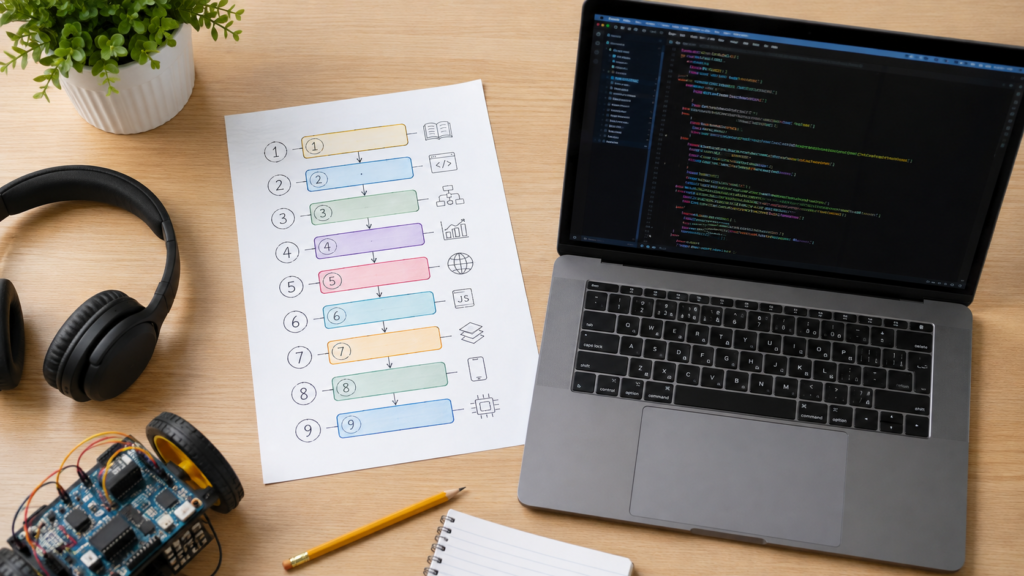
This is the sequence we use with teenagers at ItsMyBot. Each stage links to the course that covers it, so your teen always knows the next step.
Stage 1 — Beginner foundations. Variables, loops, conditions, functions. Absolute beginners can warm up through the junior coder track before stepping into teen-level work. Read how to start learning to code for the mindset.
Stage 2 — Python fundamentals. Real programs, file handling, small games. Course: fundamentals of Python programming. Practise with Python coding challenges for beginners.
Stage 3 — Advanced Python. Object-oriented programming, libraries, data handling. Course: advanced Python programming and AI foundations. Background reading: what Python is used for.
Stage 4 — AI and machine learning. Datasets, models, predictions, ethics. Course: advanced AI engineer program or AI and machine learning classes for teens. Start with what machine learning is.
Stage 5 — Web development. Structure and styling first. Course: creative web design with HTML and CSS.
Stage 6 — JavaScript. Interactivity, DOM, events, APIs. Course: JavaScript developer program.
Stage 7 — Full stack. Front end, back end, databases, deployment. Course: full stack developer program — and here’s what a full stack course covers.
Stage 8 — Java and mobile apps. Course: Java software engineering and Android app development or the standalone Android app development course.
Stage 9 — C++ and systems. Course: C++ course. Pairs naturally with robotics courses and the advanced IoT course.
The full teen pathway lives on the senior coder programme page, where each stage is mapped to age and prior experience.
Teachers and parents are welcome to share this roadmap — please credit ItsMyBot’s Coding for Teens guide.
Not sure which stage your teen belongs in?
Sit in on a free session. We’ll assess where they are and map the next three months — no pressure, no scripts.
Book a Free Demo Class →
Teens rarely pick a career at 14. But seeing where a skill leads makes the practice feel worth it.
For teens exploring where these roles sit in the wider job market, the US Bureau of Labor Statistics computer and IT occupations handbook describes each role, its education requirements and outlook in plain language.
Coding gives teenagers something specific to point at — and specificity is what admissions committees remember.
College applications. A personal statement improves the moment it describes a real thing your teen built and why. Vague enthusiasm becomes evidence.
Hackathons. Weekend build events show teamwork, deadline pressure and shipped work. Prepare using our hackathon preparation guide.
Olympiads and contests. Informatics olympiads reward algorithmic thinking, usually in C++ or Python. See how to prepare for coding competitions and competition ideas to enter.
Portfolios. A public GitHub or personal site with 3–5 working projects is the single strongest artefact a teen can carry into an application. GitHub accounts are free for students, and setting one up takes minutes.
Internships. Small companies hire capable 17-year-olds who can already read a codebase. Skills open that door earlier than most parents expect.
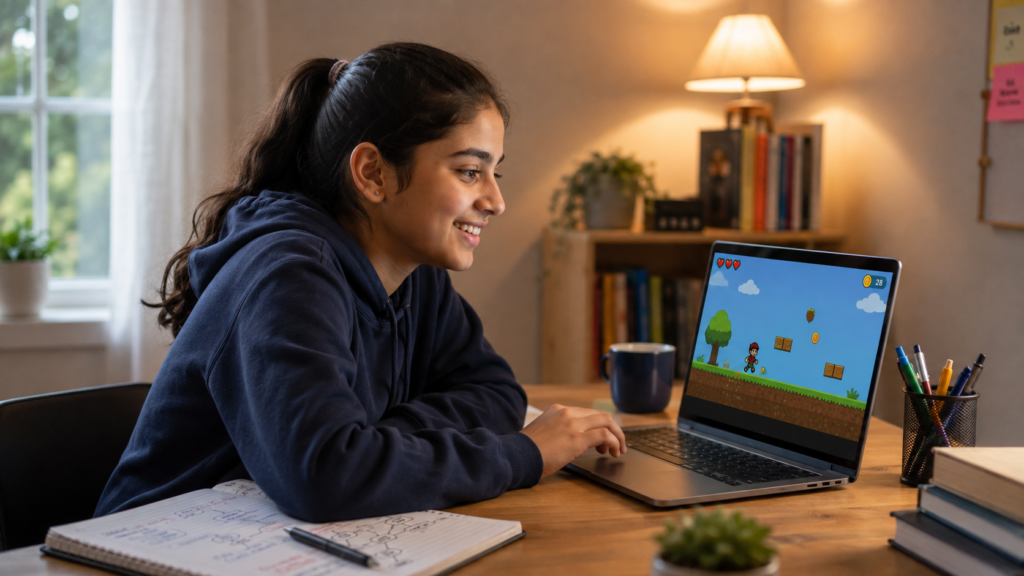
Projects turn lessons into proof. Each of these is realistic for a teen with a few months of practice.
Need science-fair-ready versions? Try Python science fair projects and 25 AI science fair projects for students.
Yes — but after Python fundamentals, not instead of them. AI classes for teens work when the student can already write loops, functions and read data from a file.
A sensible order looks like this:
Teens who want a hands-on lab environment can explore the Young Innovators AI Lab. For the bigger picture, our complete AI parent guide is written specifically for families.
How many hours per week? Two to four focused hours, split across two or three sessions. Consistency beats intensity every single time.
How much should they learn overall? Depth over breadth. One language mastered plus 3–5 finished projects is worth more than surface familiarity with five languages.
What about screen time? Building code and scrolling video are not the same activity, even on the same device. One creates, one consumes. Our guide on reducing passive screen time explains the distinction — and it’s exactly why we say ItsMyBot turns screen time into skill time.
Which language should we choose? Match it to what your teen already enjoys. Games → C++ or Python. Websites → HTML, CSS, JavaScript. Phones → Java. Data and AI → Python.
Online or in person? Live online classes give teens access to specialist mentors regardless of city. Compare formats in 1:1 versus group coding classes and our parents’ guide to online coding classes.
How do we keep them going? Motivation follows visible progress. Read how to keep teens motivated in online coding classes and how a teen gets genuinely good at coding.
❌ Mistake 1: Watching tutorials without writing code. Why it hurts: recognition feels like understanding, but it isn’t.
✅ Fix: Close the video after every concept and rebuild it from memory.
❌ Mistake 2: Switching languages every few weeks. Why it hurts: your teen restarts the beginner curve each time and never reaches the interesting part.
✅ Fix: Commit to one language for a full course cycle.
❌ Mistake 3: Copying code they can’t explain. Why it hurts: the project works, the learning doesn’t.
✅ Fix: Ask them to explain each function out loud before moving on.
❌ Mistake 4: Starting with a project that’s far too big. Why it hurts: an abandoned game teaches nothing except that coding is frustrating.
✅ Fix: Ship a small finished thing, then extend it.
❌ Mistake 5: Avoiding errors instead of reading them. Why it hurts: error messages are the fastest teacher available.
✅ Fix: Read the last line first. It almost always names the problem.
❌ Mistake 6: Coding alone with no feedback. Why it hurts: bad habits harden without review.
✅ Fix: Work with a mentor who reviews the actual code. That’s the core of our coding classes for teens.

Step 1 — Find their pull. Games, apps, websites or AI? Interest sustains practice.
Step 2 — Check the entry point. Complete beginners at 13 may start with foundations; experienced 16-year-olds jump straight into senior coder.
Step 3 — Try a class before committing. Book a free coding trial class and watch how your teen responds to the mentor.
Step 4 — Set a project goal, not an hours goal. “Publish a portfolio site by March” motivates far better than “code twice a week.”
Step 5 — Use holidays to accelerate. A summer coding camp compresses months of progress into weeks. Browse summer classes by location, or read the complete summer programs guide and what a summer coding camp covers.
Step 6 — Review progress every term. Ask what they built, not what they studied.
Still comparing providers? How to choose the right coding course walks through the questions worth asking. You can also browse all ItsMyBot courses or the wider coding for high school students programme.
Coding for teens works when three things line up: one language chosen deliberately, a roadmap that keeps moving, and finished projects your teen can show people.
Ages 13–18 are the window where curiosity turns into a portfolio. Waiting until university means starting from zero alongside students who began at 14.
Pick the next step today — Python fundamentals for most teens, or the senior coder pathway if they’re already writing code.
Any age between 13 and 18 works. Teens starting at 13 have time to reach advanced projects before university applications. Teens starting at 17 can still build a solid portfolio within a year by focusing on one language and shipping real projects rather than sampling several.
Python suits most teens. The syntax is readable, results come quickly, and it leads directly into AI and data science. Teens who want visible results fastest should start with HTML and CSS. Teens aiming at competitive programming or game engines should build toward C++.
Basic fluency takes about three to six months at two to four hours per week. Building independent projects usually takes nine to twelve months. Specialising in AI, full stack or app development adds another year of consistent practice with mentor feedback.
Yes, when classes are live and mentor-led rather than pre-recorded. Live sessions let a mentor review the actual code, catch bad habits early, and adjust pace. Our guide to online coding classes compares formats in detail.
Not for web development, app development or most general programming. Basic arithmetic and logic are enough. Maths becomes more relevant in machine learning, graphics and algorithm-heavy competitive programming — and even there, it develops alongside the coding.
Choose Python if the goal is AI, data or general programming. Choose JavaScript if the goal is building interactive websites and web apps. Both are reasonable first languages; the wrong move is starting both simultaneously.
Two to four focused hours across two or three sessions. Longer sessions produce diminishing returns for teenagers balancing school. Regular short practice builds fluency faster than occasional marathon weekends.
Three to five completed projects that solve a real problem. A portfolio website, one game, one data or AI project, and one app is a strong spread. Working, documented code matters far more than ambitious unfinished work.
Yes. AI tools speed up writing but can’t decide what to build, judge whether output is correct, or design a system. Teens who understand code direct AI tools instead of trusting them blindly — which is exactly the skill employers now screen for.
Complete beginners start with fundamentals of Python programming. Teens with some experience go straight to advanced Python and AI foundations or the full stack developer program. A free demo confirms the right level.
No. A 16-year-old learns faster than a 10-year-old because abstract reasoning is already developed. Focused work from 16 to 18 comfortably produces a portfolio strong enough for university applications and first internships.
Check the syllabus first. Many school boards teach Java or Python at higher secondary level, while competitive informatics olympiads favour C++. Our Java program and C++ course both map to exam-level depth.
Any machine with 8GB RAM handles Python, web development and app work. Chromebooks manage browser-based coding well — see the best coding websites for Chromebook. Heavier AI training benefits from more memory, but cloud tools remove that barrier for beginners.
Yes. Most teens who join ItsMyBot start with zero background. The first weeks cover variables, loops and conditions before any project work begins, so nobody is expected to arrive knowing syntax.
Short daily challenges work better than weekend cramming. Use Python coding challenges for beginners or rebuild a class project from memory. Twenty minutes a day builds more fluency than three hours on Sunday.
In practice the terms overlap. Coding usually means writing instructions in a language; programming implies the wider work of designing logic, structuring data and testing. Teens start with coding and grow into programming as projects get larger.
Web development gives faster visible results and suits teens who want to show people something. AI suits teens comfortable with maths and patient with abstract concepts. Both start from the same Python or HTML foundations, so the choice is reversible.
Indirectly, yes. Debugging trains systematic problem-solving, which transfers to maths and physics. Many students also report better focus on structured tasks — though coding classes are not a substitute for subject tutoring.
A calculator, a quiz game or a single-page portfolio site. Each takes days rather than months and produces something working. Ambitious first projects such as multiplayer games usually stall and damage confidence.
Look for live mentors, small groups or 1:1, code review rather than slide-watching, and progress updates to parents. How to choose the right coding course lists the questions worth asking before enrolling.
Adult bootcamps move too fast and assume maturity teens haven’t built yet. Age-appropriate programmes pace concepts and use projects teens care about. A summer coding camp gives the intensity without the mismatch.
Create an account, push each finished project to its own repository, and write a short README explaining what it does and how to run it. Documentation matters as much as code — reviewers read the README first.
Start with supervised learning: labelled data, training, prediction, accuracy. Read what supervised learning is and what unsupervised learning is before touching frameworks.
Some do — freelance websites, small business tools, game assets or tutoring younger students. It requires a portfolio and reliability rather than advanced skills. Treat it as a bonus, not the goal.
Shift from lessons to projects they chose themselves. Motivation returns when the work is theirs. How to keep teens motivated in online coding classes covers the practical tactics we use.
Yes. Robotics makes abstract code physical — a loop becomes a wheel turning. It suits teens who lose interest in screen-only work. Explore robotics courses and robotics with Python.
Holidays remove the school-week constraint, so daily practice becomes possible. A structured summer coding camp compresses a term of progress into weeks. Browse summer classes by location to find timings that fit your zone.
Turn screen time into skill time — see what your teen builds in one free class.
Get Started