
Your child keeps asking, “Can I make my own app?” It’s a bigger question than it sounds. App development for kids is one of the fastest-growing ways for young learners to turn screen time into skill time — and it’s more accessible than most parents realize.
This guide walks you through exactly how kids build real apps, which tools fit which age, and how to help your child go from “what’s an app?” to “I built one.” No prior coding background needed — for you or for them.
App development for kids means learning to design, build, and test simple mobile or web apps using kid-friendly tools. It’s not just about writing code — it’s about turning an idea into something that works.
A young coder might design a quiz app, a to-do list, or a simple game with buttons and screens. They learn to think through what the app does, who uses it, and how each screen connects — the same core thinking professional developers use, just scaled to a beginner level.
At ItsMyBot, our mobile app development course for kids introduces this thinking through guided, real-world projects rather than abstract theory.
Parents often ask if app development is “too advanced” for young learners. It isn’t — when it’s taught the right way.
This mirrors what we cover in our guide on why coding really helps kids — the value isn’t the code itself, it’s the thinking behind it.
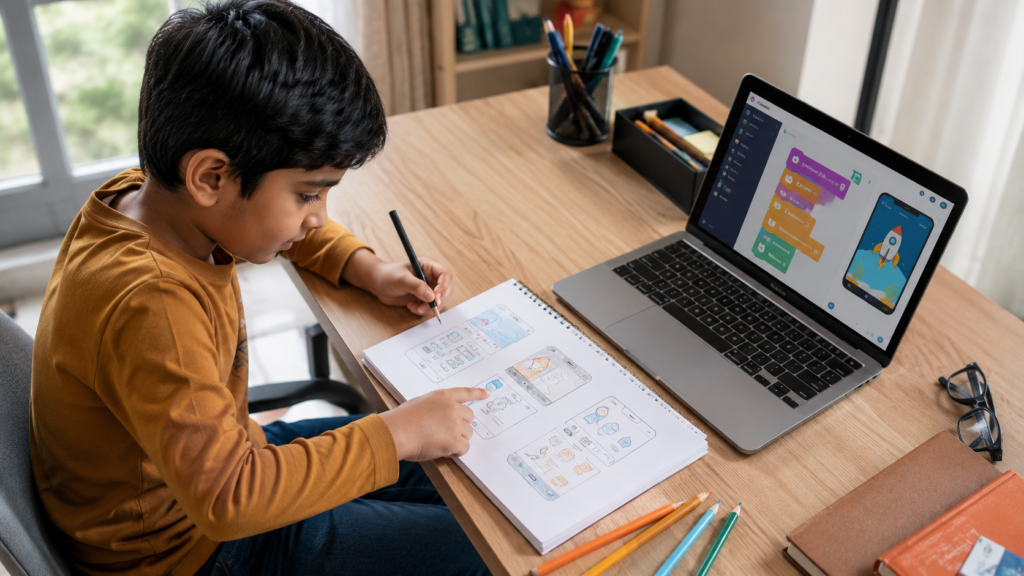
There’s no single “right” age — it depends on your child’s comfort with reading, following multi-step instructions, and basic logic.
Ages 7–9: Kids explore block-based tools that introduce sequencing and simple logic, often through Scratch coding for kids first. See our guide for 7-year-olds and 9-year-olds.
Ages 10–12: Kids are ready to move toward guided text-based app building, layering in real programming concepts. Explore options for 10-year-olds and 12-year-olds.
Ages 13–15: Teens can take on full app-building projects, including Android app development with real programming languages. Our guide on coding for high school students covers this stage in depth.
Not sure where your child fits? Our article on signs your child is ready to learn coding and the best age for kids to start coding can help you decide.
ItsMyBot also groups its full course catalog by age tier, so you can browse everything available at each stage: Little Coder for our youngest learners, Junior Coder for kids building real app and web projects, and Senior Coder for teens ready for advanced, publish-ready work.
App-building tools for kids generally fall into two categories.
Block-based builders use drag-and-drop coding blocks instead of typed syntax. They’re ideal for beginners because kids can focus on logic and structure without worrying about spelling errors in code. Compare approaches in our piece on block-based vs. text-based coding for kids.
Text-based tools introduce real programming languages like JavaScript and Python, giving kids the exact skills used in professional app development. Our guide on JavaScript classes for kids and teens and is JavaScript hard to learn? are useful starting points for parents weighing this path. Within our Junior Coder tier, kids can take this further with a dedicated JavaScript course for kids or Python course for kids, both of which feed directly into app-building skills.
| Tool Type | Best For | Skills Practiced |
|---|---|---|
| Block-based app builders | Ages 7–10, first-time coders | Sequencing, logic, planning |
| Guided text-based platforms | Ages 10–13, growing confidence | Syntax, variables, functions |
| Full coding environments | Ages 13+, motivated builders | Real languages, publishing, debugging |

Step 1: Pick a simple idea. — Why it works: A small, clear idea (a calculator, a quiz, a to-do list) keeps kids motivated instead of overwhelmed.
Step 2: Sketch the screens on paper. — Why it works: Planning before building teaches kids to think like designers, not just typists.
Step 3: Build the first screen. — Why it works: Seeing one working screen creates an early win that fuels momentum.
Step 4: Add logic and buttons. — Why it works: This is where sequencing and “if this, then that” thinking take shape.
Step 5: Test, break it, and fix it. — Why it works: Debugging is the single most valuable skill in all of app development — professional developers do this daily.
This is one of the most common parent questions, and the honest answer is: most kids benefit from both, in sequence.
The transition point is different for every child. Our guide on moving from Scratch to Python explains what that shift actually looks like in practice.
❌ Mistake 1: Jumping straight to advanced coding languages. Why it’s problematic: Kids can get discouraged before they understand core logic. ✅ Correct approach: Start block-based, then transition when ready — not before.
❌ Mistake 2: Choosing tools based on age labels alone. Why it’s problematic: Readiness varies more by comfort with logic than by birthday. ✅ Correct approach: Use a short trial class to gauge fit — book a free coding trial class.
❌ Mistake 3: Treating “finishing the tutorial” as the goal. Why it’s problematic: Copying steps without understanding builds false confidence. ✅ Correct approach: Prioritize projects where your child makes their own design choices.
❌ Mistake 4: Skipping the planning stage. Why it’s problematic: Kids who jump straight to building often get lost mid-project. ✅ Correct approach: Always sketch the app idea first, even informally.
Scenario A — The First-Timer (Age 8): Starts with block-based logic through Scratch coding for kids, builds a simple animated quiz app. ✅ Best fit: Junior-level block-based app building.
Scenario B — The Confident Builder (Age 11): Has basic block-coding experience, ready to explore JavaScript fundamentals and simple app logic. ✅ Best fit: Guided text-based app development, paired with our JavaScript classes for kids and teens.
Scenario C — The Motivated Teen (Age 14): Wants to build and eventually publish a real Android app. ✅ Best fit: Our Android app development course, paired with full-stack development fundamentals.
ItsMyBot pairs kids with mentors for live, 1:1 or small-group classes that adapt to each child’s pace — not a fixed curriculum everyone follows the same way. This is a core part of our approach; see how it compares in live 1:1 coding classes vs. group classes.
Depending on your child’s age and experience, we recommend starting with:
Families also often combine app-building with our weekend classes, after-school programs, or summer coding camp, depending on the family’s schedule. You can also browse our full catalog by age tier — Little Coder, Junior Coder, and Senior Coder — to find the right starting point.
Most kids can begin exploring app-building logic around age 7–8 using block-based tools. See our best age for kids to start coding guide for a fuller picture based on your child’s stage.
No. Block-based app builders let kids start with zero coding background. Text-based app development, like with JavaScript, typically comes later.
App development focuses on mobile or tablet-based programs, while web development focuses on websites. Many kids explore both — our creative web design course for kids is a great companion path.
With guided teen-level courses like our Android app development course, motivated older kids can work toward publishable projects.
Simple first apps can be built in a few guided sessions. Confidence and independence typically grow over several months of consistent practice.
Not better — sequential. Most successful young app builders start with Scratch coding for kids to build logic, then move into app-specific tools.
This is common and normal. Small, achievable milestones — not long tutorials — keep motivation alive. A mentor-led, 1:1 approach helps recalibrate the pace in real time.
App development gives kids more than a technical skill — it gives them a way to turn imagination into something real and usable. From a child’s first block-based quiz app to a teen’s first published Android build, every step builds confidence, patience, and problem-solving.
Getting the starting point right matters. Choosing a tool that’s too advanced too soon can turn excitement into frustration — while the right guided path keeps curiosity alive.
If your child has an app idea waiting to happen, explore our mobile app development course for kids or book a free demo to find the right starting point together.
Help your child transform creative ideas into real mobile apps while building coding, problem-solving, and future-ready skills—one project at a time.
Get Started →
Online coding, AI, and robotics classes that help kids ages 5–16 build real skills — and confidence — one project at a time.
No commitment · Live class with an expert teacher
© ItsMyBot 2026. All Rights Reserved.