
At a Glance
- What: A step-by-step way to choose the right coding course for your child.
- Who: Parents of kids aged 5–15 comparing coding programs.
- Why: The wrong course wastes months and can turn kids off coding for good.
- When: Before you pay, ideally after a free trial class.
- How: Match age and interests, check the curriculum, compare formats, and ask the right questions.
There are hundreds of coding courses for kids. They all promise fun, skills, and a bright future. So how do you pick the one that actually works for your child?
Get it wrong, and the cost is bigger than money. A course that’s too hard, too easy, or too passive can make your child decide “coding isn’t for me.”
This guide gives you a clear framework: an age map, a 10-point checklist, red flags, and the exact questions to ask. Start by browsing our online coding classes for kids and teens as a reference point.
Quick Facts
- 5 is the earliest typical start for block-based coding, and ages 10–11 suit text-based Python.
- Live classes beat pre-recorded for most kids under 12, because real-time feedback prevents stalls.
- Plan for 3–6 months before judging whether a course is working.
- Analytical thinking is the #1 core skill employers want, cited by 7 in 10 companies (WEF Future of Jobs 2025).
- 39% of key job skills are expected to change by 2030 (WEF, 2025), so adaptable foundations matter more than any one tool.
- Always ask for a free trial before committing. It’s the fastest way to test fit.
Why Does Choosing the Right Coding Course Matter?
Coding builds problem-solving, logical thinking, creativity, and confidence. Those skills help in maths, science, and everyday decisions.
But the course shapes the experience. A good course builds curiosity. A poor fit builds frustration.
- The right course: your child builds projects, explains their code, and asks for more.
- The wrong course: your child watches videos, copies code, and loses interest.
With AI changing how software is built, kids need to understand code, not just type it. Read more in our guide on why learn coding in the AI era and is coding really helpful for kids.
What’s Your Child’s Learning Style?
Match the course style to how your child learns best.
| Learning style | Signs you’ll notice | Best course type | Try this |
|---|---|---|---|
| Visual | Loves drawing, videos, animations | Block coding, animation, game design | Scratch course |
| Hands-on | Takes things apart, builds with Lego | Robotics, hardware, IoT | Robotics courses |
| Analytical | Enjoys puzzles, maths, logic games | Python, debugging challenges | Python course |
| Social | Loves teamwork and sharing | Group projects, competitions | Coding competition ideas |
| Story-driven | Loves games and worlds | Game development | Roblox game development |
Quick test: watch how your child tackles a new toy or puzzle. Do they read instructions, dive in, or ask for help? That tells you a lot.
Not sure they’re ready? See signs your child is ready to learn coding.
What Age Should Kids Start Coding, and With What?
| Age | Stage | Best tools | ItsMyBot path |
|---|---|---|---|
| 5–7 | Visual block coding, sequencing | ScratchJr, unplugged games | Little Coder · Coding for 5-year-olds |
| 7–10 | Advanced blocks, first games | Scratch 3.0, Blockly | Scratch course · Classes for 8-year-olds |
| 10–12 | First text code with support | Python, HTML/CSS | Python course · Classes for 10-year-olds |
| 12–14 | Text code, AI, web, apps | Python, JavaScript, C++ | AI & ML course · Classes for 12-year-olds |
| 14+ | Specialisation | Python, Java, JavaScript, C++ | Senior Coder · Coding for high school |
Readiness matters more than age. Reading level, attention span, and interest are better guides than a birthday.
Learn more: best age for kids to start coding and the ABCs of coding.
The 10-Point Coding Course Checklist
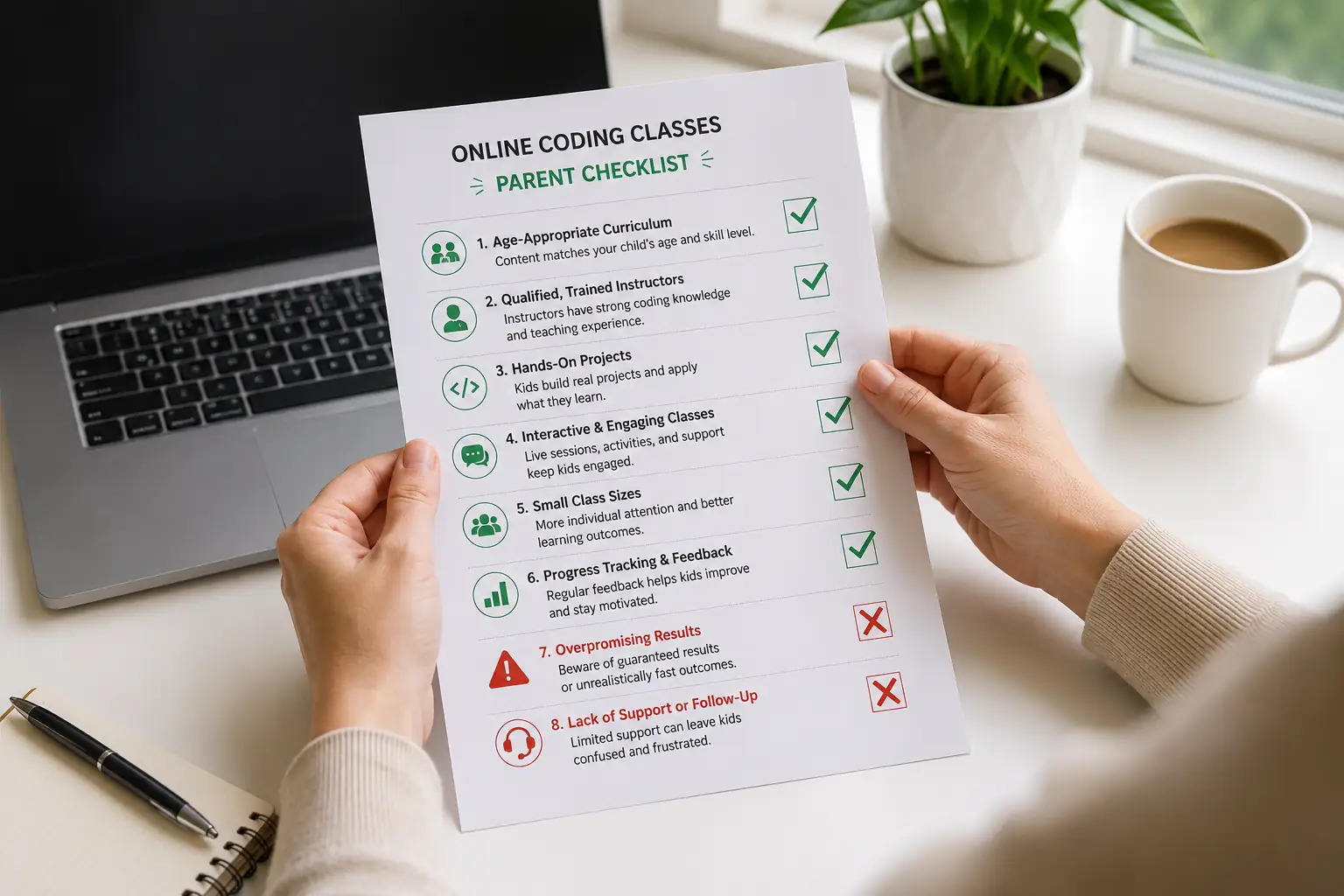
Use this checklist when comparing any coding course:
- ✅ Live instruction with real-time feedback, not videos alone
- ✅ Small class sizes (1-on-1 or up to 6–8 students)
- ✅ Personalised pace that adapts to your child
- ✅ Clear progression from beginner to advanced levels
- ✅ Project-based learning with a portfolio your child keeps
- ✅ Industry tools like Python, VS Code, and GitHub (for older kids)
- ✅ Qualified, vetted instructors with a transparent selection process
- ✅ Regular progress reports for parents
- ✅ Flexible scheduling and a fair makeup-class policy
- ✅ A free trial with a level recommendation
A course that ticks 8 or more is worth a trial. Fewer than 6 is a warning sign.
Not Sure Which Course Fits?
Book a free trial and get a personalised course recommendation from a live instructor. Book a Free Trial Class →
Block-Based vs Text-Based Coding: What’s Right for Your Child?
| Block-based coding | Text-based coding | |
|---|---|---|
| Best age | 5–10 | 10+ |
| How it works | Drag-and-drop visual blocks | Typed code like Python |
| Pros | No typos, instant results, builds logic fast | Real-world skills, unlimited projects |
| Cons | Limited for advanced projects | Syntax errors can frustrate beginners |
| Examples | ScratchJr, Scratch, Blockly | Python, JavaScript, C++ |
Recommended path: ScratchJr (5–7) → Scratch 3.0 (7–10) → Python (10–11+) → specialise (12+).
Go deeper with block-based vs text-based coding for kids, advantages and disadvantages of block coding, and moving from Scratch to Python.
Comparing Popular Coding Languages for Kids
| Language | Ages | Difficulty | Best for | Sample project | Course |
|---|---|---|---|---|---|
| Scratch | 7–11 | ⭐ | Logic, games, animation | Maze game | Scratch |
| Python | 10+ | ⭐⭐ | AI, data, games | Chatbot | Python |
| HTML/CSS | 10+ | ⭐⭐ | Websites, design | Personal website | Web design |
| JavaScript | 12+ | ⭐⭐⭐ | Interactive web, games | Browser game | JavaScript |
| Luau (Roblox) | 8–12 | ⭐⭐ | 3D games | Obby with leaderboard | Roblox |
| C++ | 12+ | ⭐⭐⭐⭐ | Robotics, competitive coding | Arduino project | C++ |
| Java | 13+ | ⭐⭐⭐⭐ | Android apps, AP CS | Mobile app | Java & Android |
Our recommendation: Scratch for kids under 10, Python for most kids 10+.
Compare more in Scratch vs Python for kids, Python vs Java, and HTML vs CSS vs JavaScript.
Online vs In-Person, 1-on-1 vs Group: Which Format Works Best?
Online vs in-person
| Online (live) | In-person | |
|---|---|---|
| Flexibility | ✅ High: evenings, weekends | ⚠️ Fixed schedule and travel |
| Instructor access | ✅ Global talent pool | ⚠️ Local only |
| Screen-sharing for code reviews | ✅ Built in | ⚠️ Varies |
| Hands-on hardware | ⚠️ Needs a kit or simulator | ✅ Easy |
| Social interaction | ⚠️ Virtual | ✅ Face to face |
1-on-1 vs group classes
| 1-on-1 | Small group (up to 6) | |
|---|---|---|
| Pace | Fully personalised | Shared pace |
| Best for | Shy kids, fast learners, specific goals | Social kids who enjoy teamwork |
| Attention | 100% on your child | Shared, but still interactive |
| Cost | Higher | Lower |
Quality beats format. A great online mentor beats a crowded in-person class every time.
Explore further: is online coding worth it for kids, live 1-on-1 vs group coding classes, and our online coding classes parents’ guide 2026.
How Do You Evaluate a Coding Course Curriculum?
| 🚩 Red flags | ✅ Green flags |
|---|---|
| Vague course descriptions | Skills listed for every lesson |
| Pre-recorded videos only | Live instruction with Q&A |
| “Master coding in 4 weeks” promises | Realistic timelines (months, not weeks) |
| No sample student projects | A visible student project portfolio |
| No assessment or placement | A free trial with level recommendation |
| Same pace for every child | Personalised, mastery-based pacing |
| No parent updates | Regular progress reports |
Ask to see 3 real student projects at your child’s level. It’s the fastest quality test there is.
What Common Mistakes Do Parents Make When Choosing Coding Courses?
❌ Mistake 1: Ignoring your child’s interests
- Why it’s a problem: a robotics fan forced into web design will lose interest.
- ✅ Better approach: start with what excites them: games, robots, or AI.
❌ Mistake 2: Starting too advanced or too simple
- Why it’s a problem: too hard frustrates, too easy bores.
- ✅ Better approach: use a placement assessment or free trial.
❌ Mistake 3: No clear goal or timeline
- Why it’s a problem: you can’t measure progress without a target.
- ✅ Better approach: set a goal like “build 3 games in 6 months.”
❌ Mistake 4: Choosing on marketing hype
- Why it’s a problem: flashy ads don’t equal good teaching.
- ✅ Better approach: request sample projects and parent reviews.
❌ Mistake 5: Ignoring instructor quality
- Why it’s a problem: the teacher shapes everything.
- ✅ Better approach: ask how instructors are selected and trained.
❌ Mistake 6: Expecting instant results
- Why it’s a problem: real skills take months.
- ✅ Better approach: commit to 3–6 months, then review.
❌ Mistake 7: Picking apps over real coding
- Why it’s a problem: tap-through apps rarely build deep problem-solving.
- ✅ Better approach: choose courses where kids create original projects. See myths about coding for kids.
What Questions Should You Ask Before Enrolling?
About the program
- How many hours a week does it need?
- What’s the class size?
- What’s the makeup-class policy?
- What equipment or software do we need?
About progress and communication
- How will I know my child is improving?
- How often will I get progress reports?
- Can I talk to the instructor directly?
About results
- Will my child build a portfolio?
- Is there a certificate on completion?
- Do you support coding competitions?
About teaching
- Are classes live or recorded?
- How do you adjust pace for my child?
- How are instructors selected and trained?

A Parent’s Decision Story
Illustrative example of a typical decision process, not a specific family record.
Meet the Mehtas. Their 9-year-old daughter, Anya, loved drawing and animated videos. They’d tried a coding app, but she stopped after two weeks.
How they chose:
- Step 1: They noticed Anya was a visual, story-driven learner.
- Step 2: They shortlisted 3 courses and used the 10-point checklist. Two scored below 6.
- Step 3: They booked a free trial. The instructor recommended Scratch animation first.
- Step 4: They set a goal: 3 animated stories in 4 months.
What happened: Anya finished 4 projects in 4 months, then asked to learn Python. Choosing for fit, not hype, made the difference.
Key Takeaways
- Match the course to your child’s age, interests, and learning style.
- Use the 10-point checklist. 8+ ticks is worth a trial.
- Start with blocks under 10, Python around 10–11.
- Live, small classes with clear progression work best for most kids.
- Always try before you buy, and commit 3–6 months before judging.
Conclusion
The right coding course fits your child, not just the market. When it matches their age, interests, and pace, coding becomes something they want to do, not something they have to do.
Use the checklist, ask the hard questions, and always start with a trial. Your child’s first course doesn’t need to be perfect. It needs to make them want the next one.
Ready to find the right coding course for your child? Book a Free Trial Class → · Browse All Courses →
Frequently Asked Questions
What’s the best age to start a coding course for kids?
Kids can start block-based coding around age 5 with tools like ScratchJr. Text-based languages like Python suit kids around 10–11. Readiness matters more than age, so look at reading level, attention span, and interest before choosing a course.
Should my child learn Scratch or Python first?
For kids aged 5–10, start with Scratch to build logic without typing stress. For kids 11+ with solid reading skills, Python is a great first language. Most kids do best moving from Scratch to Python once loops and conditions make sense.
Are online coding classes as good as in-person?
Yes, when they’re live and small. Online classes offer flexible scheduling, global instructors, and screen-sharing for code reviews. Quality of instruction matters far more than format. Pre-recorded-only courses are the ones to be careful with.
Are 1-on-1 or group coding classes better?
1-on-1 classes suit shy kids, fast learners, or children with specific goals, since pace is fully personalised. Small groups of up to 6 suit social kids who enjoy teamwork and cost less. A free trial helps you decide.
How do I know if a coding course is working for my child?
Look for finished projects, your child talking about coding at home, choosing to code in free time, and improved problem-solving in other subjects. Give a new course 3–6 months before judging results.
What equipment does my child need for a coding course?
A laptop or desktop with reliable internet is enough for most courses. Aim for 8GB RAM and a recent processor for smooth performance. Tablets work for very young kids but aren’t ideal for text coding. Chromebooks work for many web-based tools.
How much should a good coding course cost?
Prices vary widely by format, from group classes to 1-on-1 mentoring. Compare value, not just price: live instruction, small classes, progress reports, and a portfolio. Monthly billing without long lock-ins lowers your risk.
Can my child join coding competitions after a course?
Yes. After 6–12 months of consistent learning, most kids are ready for age-appropriate challenges and hackathons. Choose a course that encourages competitions and projects. See our guide on preparing kids for coding competitions.
Related Reading
- Best Age for Kids to Start Coding
- Signs Your Child Is Ready to Learn Coding
- Is Online Coding Worth It for Kids?
- Live 1-on-1 vs Group Coding Classes
- Best Coding Classes for 8-Year-Olds
- Scratch vs Code.org: Which Is Best?
- AI vs Coding Classes for Kids
- Coding vs Robotics for Kids
- Top Coding Programs for Kids in 2026
- Online Coding Classes for Homeschoolers
- Minimum Hardware Requirements for Python
