✦ Junior Coder - Ages 7–12

Foundations of JavaScript for Kids

Introduce your child to the exciting world of app development using JavaScript - one of the most widely used programming languages in the world. In this live, project-based course, students learn how to build interactive applications, create logic-driven programs, manage data, and design functional mini apps using beginner-friendly coding tools and hands-on activities.
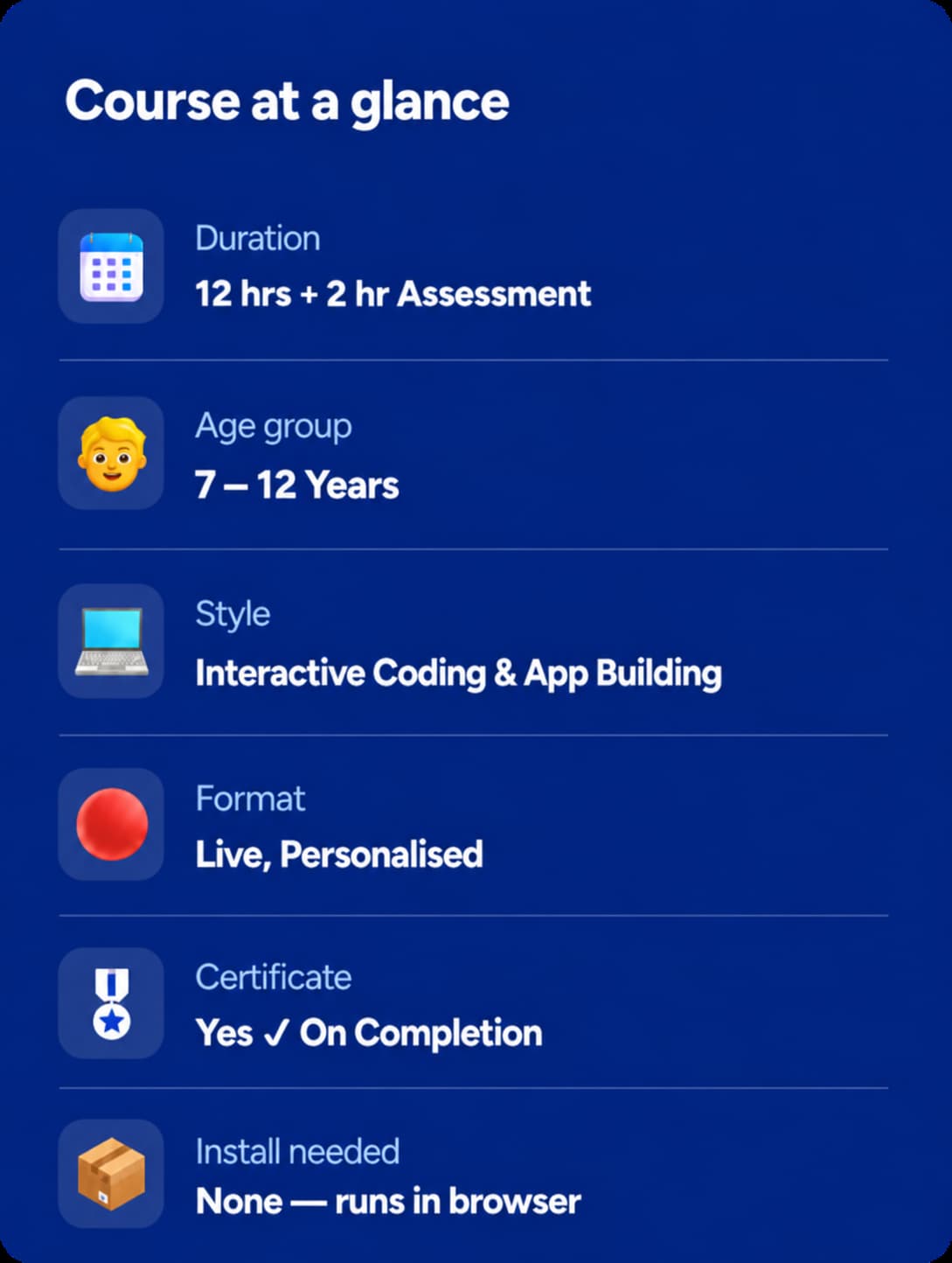
⏱ 20–24 Hours
🔴 Live, Personalized
📱Interactive Coding & App Building
🎖 Certificate On Completion
Rated 4.8/5
on TrustPilot
Rated 4.8/5
on Google
500,000+
Hours of learning
40+
Countries

Junior Coder

Ages 7–12
Curriculum Designed By Educators And Technologists Who Worked For Tech Leaders
About Course

What Is This Course About?

JavaScript powers websites, games, apps, and interactive digital experiences used every day around the world. This beginner-friendly course introduces children to the foundations of JavaScript programming through creative projects, app development, and real coding challenges.
Students learn how to build interactive applications using concepts like variables, conditionals, loops, functions, user inputs, and data storage - all through guided hands-on practice and project-based learning.
The course focuses on helping children understand coding logic while encouraging creativity, experimentation, and problem-solving. Every session is taught live with personalized instructor support to ensure students build confidence step by step.
By the end of the course, students will have created multiple working apps and gained strong foundational programming skills that prepare them for advanced coding and software development learning.
Book a Free Trial Class
Why This Course?

What Your Child Actually Gains

JavaScript Fundamentals
Learns real-world JavaScript programming fundamentals in a beginner-friendly way. Builds confidence using one of the world’s most important programming languages.
Coding Logic & Problem Solving
Understands coding logic through practical app-building projects. Learns problem-solving concepts like conditions, loops, and reusable functions.
Interactive Application Development
Builds interactive applications with buttons, inputs, outputs, and user interaction. Creates projects that combine coding, creativity, and app design principles.
Data & Record Management
Explores data storage, record management, and simple databases while building applications that organize, manage, and display information through user interaction.
Computational Thinking Skills
Develops computational thinking and structured programming habits through hands-on coding activities and project creation.
Personalized Support & Certification
Receives personalized instruction, live feedback, and continuous support. Earns an ItsMyBot certificate upon successful completion of the course.
Why ItsMyBot

What Will Your Child Create?

A “Hello World” Interactive App

A Simple Calculator with User Inputs

An Age Checker using Conditional Logic

A Multiplication Table Generator using Loops

A Temperature Converter using Functions

A Number Guessing Game

A Favorite Color Saver with Data Storage

A Contact Book Application

A Task Manager App with CRUD Operations

A Favorite Food Survey Chart

A Voting App or Quiz App with Leaderboards

Note: Projects may vary slightly depending on the child’s pace, creativity, and instructor-led customization.
Course Curriculum

What Students Learn

20-24 Hrs of live instruction. Each module builds on the last.

Modules 1–5

Module 1: Introduction to App Lab & JavaScript Basics

  • Understanding app development concepts
  • Introduction to App Lab interface
  • Exploring the toolbox and workspace
  • Using the Run button and console
  • Introduction to JavaScript basics
  • Working with prompts and outputs
  • Understanding user interaction
  • Beginner app-building activities

Module 2: Variables & Data Types

  • Understanding variables in JavaScript
  • Storing text and numerical values
  • Introduction to data types
  • Working with user inputs
  • Displaying information dynamically
  • Using promptNum and setText
  • Interactive coding exercises
  • Variable-based mini projects

Module 3: Conditions & Decision Making

  • Introduction to conditionals
  • Understanding if and else statements
  • Comparison operators and logic
  • Decision-making applications
  • User response handling
  • Interactive conditional activities
  • Smart app behavior concepts
  • Logic-based coding projects

Module 4: Loops & Repetitive Tasks

  • Introduction to loops in JavaScript
  • Understanding for and while loops
  • Repeating actions automatically
  • Using counters and iteration
  • Building automated programs
  • Pattern and repetition activities
  • Interactive loop-based challenges
  • Coding mini projects

Module 5: Functions & Reusable Code

  • Introduction to functions
  • Creating custom functions
  • Parameters and return values
  • Organizing code efficiently
  • Reusing logic in applications
  • Function-driven app behavior
  • Interactive coding activities
  • Function-based mini projects

Modules 6–10

Module 6: Combining JavaScript Concepts

  • Using variables, loops, and conditions together
  • Combining functions with logic systems
  • Building complete interactive workflows
  • Understanding program structure
  • Real-world coding problem solving
  • Interactive game logic concepts
  • Multi-concept coding activities
  • Integrated JavaScript mini project

Module 7: Introduction to Data & Storage

  • Understanding data in applications
  • Introduction to storage systems
  • Tables versus key/value pairs
  • Using getKeyValue and setKeyValue
  • Saving and retrieving information
  • Persistent data concepts
  • Interactive storage activities
  • Data-saving mini projects

Module 8: Creating & Reading Records

  • Introduction to database records
  • Understanding table schemas
  • Using createRecord functions
  • Reading and displaying stored data
  • Organizing structured information
  • Data retrieval techniques
  • Interactive database activities
  • Record-based mini projects

Module 9: Updating & Deleting Records

  • Modifying stored data
  • Using updateRecord functions
  • Removing records with deleteRecord
  • Managing user-generated data
  • CRUD operation concepts
  • Dynamic database interactions
  • Data management activities
  • Database editing mini projects

Module 10: Building Mini Database Applications

  • Combining UI and database systems
  • Creating complete CRUD applications
  • Integrating variables and conditions
  • Managing user interactions
  • Designing structured app workflows
  • Real-world app development concepts
  • Interactive coding challenges
  • Full database mini project

Modules 11–15

Module 11: Data Visualization & Charts

  • Understanding data visualization
  • Creating charts and graphs
  • Using drawChart functions
  • Displaying data visually
  • Analyzing survey and user data
  • Interactive graph activities
  • Visual storytelling with data
  • Chart-based coding projects

Module 12: Interactive JavaScript Games

  • Designing game logic systems
  • Building number guessing games
  • User input and scoring systems
  • Interactive gameplay mechanics
  • Random number concepts
  • Coding entertainment projects
  • Problem-solving through games
  • Game development mini projects

Module 13: User Interface Design for Apps

  • Designing app layouts and screens
  • Organizing buttons and components
  • Improving user experiences
  • Creating clean interfaces
  • Responsive app design basics
  • Interactive UI customization
  • Design-focused coding activities
  • Interface mini projects

Module 14: Smart App Automation

  • Automating tasks with JavaScript
  • Event-driven programming concepts
  • User-triggered actions
  • Interactive workflow systems
  • Dynamic content updates
  • Smart automation activities
  • Logic-driven app design
  • Automation mini projects

Module 15: Working with User Inputs

  • Collecting user information
  • Input validation concepts
  • Dynamic user interaction systems
  • Interactive forms and controls
  • Error handling basics
  • User-friendly app experiences
  • Real-time input activities
  • Input-based mini projects

Modules 17–20

Module 16: Arrays & Data Collections

  • Introduction to arrays
  • Storing multiple values
  • Accessing and updating arrays
  • Looping through collections
  • Organizing large sets of data
  • Interactive list activities
  • Collection-based app systems
  • Array mini projects

Module 17: Functions & Modular Programming

  • Advanced function concepts
  • Breaking programs into modules
  • Reusable coding strategies
  • Organizing app functionality
  • Efficient code management
  • Function-driven applications
  • Coding structure activities
  • Modular coding projects

Module 18: Interactive Quiz & Survey Apps

  • Building quiz applications
  • Score tracking systems
  • Survey collection concepts
  • User feedback applications
  • Dynamic question handling
  • Interactive educational apps
  • Smart result management
  • Quiz-based mini projects

Module 19: Creative JavaScript Projects

  • Combining multiple coding concepts
  • Designing real-world applications
  • Creative coding activities
  • Personalized app-building
  • Interactive entertainment concepts
  • Multi-feature applications
  • Innovation-focused projects
  • Creative coding showcase

Module 20: Advanced App Development Concepts

  • Integrating UI, logic, and storage
  • Improving application structure
  • Advanced problem-solving techniques
  • Real-world coding practices
  • Optimizing user interactions
  • Enhancing app experiences
  • Advanced coding challenges
  • Full-feature mini projects

Modules 21

Module 21: Capstone Project Development

  • Planning complete applications
  • Combining all learned concepts
  • Database and UI integration
  • Testing and debugging applications
  • Building independent coding projects
  • Presentation preparation activities
  • Final coding implementation
The ItsMyBot Advantage

Why Parents Love Our Programs

Every child learns differently. That's why we combine exceptional educators, personalised guidance, and continuous progress tracking to create a learning experience parents can trust and children enjoy.
Expert Coding Mentors
Live, personalized instruction with expert coding mentors
Project-Based Learning
Project-based learning focused on creativity and practical application
Flexible Class Scheduling
Flexible class scheduling including weekends and evenings
Progress Tracking & Parent Feedback
Continuous progress tracking and parent feedback sessions
Beginner-Friendly Learning
Beginner-friendly approach with step-by-step guidance
Safe & Engaging Environment
Safe, engaging environment designed to build confidence and curiosity
Simple start

How it works

3 Easy Steps to Get Started:

1

Book a free trial

Fill in the form. An academic counsellor will schedule a free session and assess your child's current level and interests.
2

Get a personalised roadmap

Based on the trial, counsellors build a custom learning path - right pace, right projects, right instructor for your child.
3

Build, learn, and earn

Live sessions, progress reports after every class, parent feedback calls, and a certificate on completion. Your child keeps all their projects.
faqs

Get to Know Us Better

No prior coding experience is required. The course is designed for complete beginners.

Students learn JavaScript, one of the world’s most popular programming languages.

Students build apps using beginner-friendly App Lab tools designed for young coders.

Yes! Students create multiple interactive apps, games, and data-driven projects throughout the course.

The course is highly hands-on and project-based with live coding activities in every session.

Yes. All classes are live, interactive, and personalized according to each child’s learning pace.

Yes! Students receive an ItsMyBot certificate upon successful course completion.

testimonials

Trusted by Parents like You!

I was extremely happy with the teacher and her approach to my daughter, like a close family teacher.
By Canavady
Rated 5/5
My daughter, Rishika is thoroughly enjoying the learning experience at ItsMyBot.

Ms. Poornima is teaching the program very well, at the right pace, making sure Rishika understands the concepts well. During the feedback session, she provided the details of Rishika’s strengths and areas of improvement giving me the confidence that she is well aware of how to guide her holistically.

The daily class reports and feedback gives a clear understanding of the progress in each class.

I also appreciate the excellent coordination, hassle free class scheduling and timely response to queries by Sandhya.

I would definitely recommend ItsMyBot to my friends and family.
By rehana
Rated 5/5
Enrolling my son in classes in September has been a great decision. The trial class helped us identify his interests, and Ms. Jiya's engaging approach has made learning enjoyable. I appreciate her encouragement for my son to draw and write, recognizing it as a positive habit for his development.

The flexibility of classes is a significant advantage, accommodating our unpredictable schedule. Ms. Jiya's understanding and willingness to reschedule when needed make the learning process enjoyable for both my son and us as parents.

I'm grateful for the positive environment Ms. Jiya creates, and we look forward to more enjoyable learning experiences. Kudos to the iTSMYBOT team for their exceptional responsiveness and clear lesson reports, contributing to a smooth and enriching educational journey for our son.
By Dimple Jain
Rated 5/5

Rated 4.7 out of 5 based on  65 reviews on Trustpilot

🚀 Hurry! Reserve Your FREE Trial Class Seat Today

Ready to Build Real Apps with JavaScript?

Help your child explore the world of coding through interactive app development, creativity, and hands-on programming.
ItsMyBot
Empowering children with the right skills today enables them to drive innovation tomorrow. Join us on this exciting journey, and let's unlock the boundless potential within every child.
© ItsMyBot 2026. All Rights Reserved.