
Your child is bright, curious, and learning at home — but you’re not sure whether coding belongs on the timetable, or how to even start.
Most generic courses weren’t built for homeschoolers. They assume a classroom structure, a fixed pace, and a teacher standing in the room. When that doesn’t fit, your child either gets bored or falls behind — and your confidence as a parent-educator takes a hit.
Online coding classes for homeschoolers solve that problem. They’re designed to adapt to your child’s pace, spark genuine curiosity, and build skills that actually matter. This guide gives you everything you need to make the right call.
What: Structured, live or self-paced coding courses delivered online, designed specifically for children learning outside of a traditional school environment.
Who: Children aged 5–15 being home-educated, whose parents want to build future-ready digital skills alongside core academics.
Why: The digital economy rewards people who can build, not just browse. Coding teaches your child to think logically, create independently, and solve real problems.
When: Any time — most programs offer flexible scheduling to match your homeschool day.
How: Through project-based lessons, mentor guidance, and hands-on builds in languages like Scratch, Python, and beyond.
Online coding classes for homeschoolers aren’t just an extra-curricular. For many families, they’ve become the cornerstone of a future-focused homeschool curriculum.

Homeschooling parents choose coding because it teaches skills no textbook can fully replicate. It builds logical reasoning, creative problem-solving, and persistence — all in one subject.
But there’s a bigger reason too. The world your child is growing into runs on code. AI, robotics, smart devices, and digital platforms are not trends — they’re infrastructure. A child who understands how to build and program technology will have options that others simply won’t.
Here’s what coding develops that parents value most:
For a deeper look at why STEM belongs in every child’s education, explore Why Is STEM Education Important for Kids? — and if your child is just getting started, the History of STEM Education gives useful context on how this movement took shape.
This is the question every parent needs answered before enrolling. The best programs go far beyond teaching syntax. They use real projects to build real skills.
Core coding skills your child will develop:
By the end of a structured course, your child won’t just “know coding.” They’ll have built a working game, programmed a robot, written Python scripts, or developed a simple app. That portfolio of real projects builds genuine confidence.
If your child is 8 or 9 and just starting out, see the best coding classes for 8-year-olds and best coding classes for 9-year-olds to find the right entry point.
For older learners ready for more challenge, the best coding classes for 12-year-olds covers structured progression into Python and beyond.
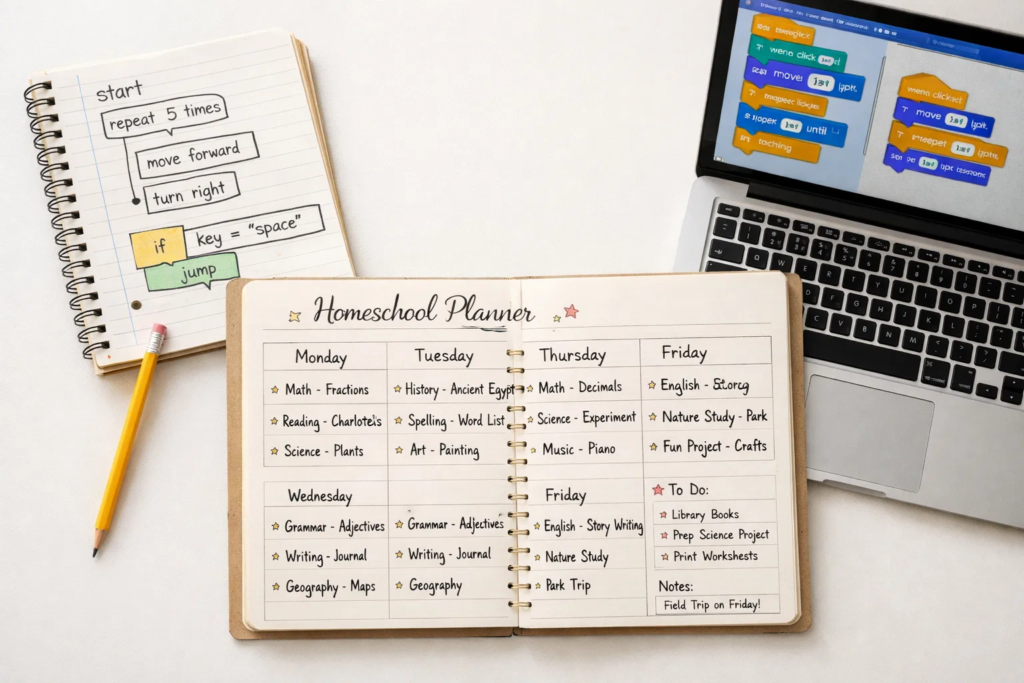
Flexibility is one of the biggest advantages of online coding for homeschoolers. You’re not locked into a school timetable, and neither are the best programs.
Typical scheduling options include:
A sample weekly integration for homeschoolers:
| Day | Activity |
|---|---|
| Monday | Core academics (math, English) |
| Tuesday | Live coding session (45–60 mins) |
| Wednesday | Independent project work |
| Thursday | Science / STEM activities |
| Friday | Coding project review + free build time |
The key is consistency, not volume. Two focused sessions per week produce more genuine progress than five distracted ones.
Not all programs are equal. Here’s what genuinely matters — and what’s just marketing.
Green flags — what a strong program looks like:
What to avoid:
For families exploring STEM robotics as part of their homeschool program, ItsMyBot’s STEM robotics classes for kids offer a structured, mentor-led pathway.
Every parent wants to get this right. These are the most common missteps — and how to avoid them.
❌ Mistake 1: Choosing the cheapest option available Why it’s a problem: Low-cost programs often cut corners on mentorship, curriculum quality, and support.
✅ Correct approach: Evaluate the quality of instruction first. A free trial or demo session tells you far more than a pricing page.
❌ Mistake 2: Starting with a language that’s too advanced Why it’s a problem: A child thrown into Python before mastering logic basics gets frustrated and disengages quickly.
✅ Correct approach: Match the starting point to your child’s age and prior experience. Scratch is the right start for most kids aged 5–9. Check the best coding classes for 7-year-olds for guidance.
❌ Mistake 3: Prioritising certification over skill-building Why it’s a problem: A badge without a project portfolio means nothing to future educators or employers.
✅ Correct approach: Ask to see examples of what past students have built. Projects are the proof of learning.
❌ Mistake 4: Treating coding as a solo activity Why it’s a problem: Kids who work in isolation miss out on collaboration, peer learning, and the confidence that comes from sharing their work.
✅ Correct approach: Choose programs with group sessions, showcase events, or community interaction.
❌ Mistake 5: Skipping the demo session Why it’s a problem: You can’t truly assess teaching style, curriculum fit, or your child’s engagement from a website alone.
✅ Correct approach: Always book a free demo. Watch how the mentor interacts with your child — that relationship drives everything.
ItsMyBot was built on a clear mission: turning screen time into skill time. For homeschooling families, that mission is especially relevant.
Your child is already spending time on screens. The question is whether that time builds something — or just passes.
What makes ItsMyBot different for homeschoolers:
ItsMyBot’s coding classes for kids cover a wide range of ages and skill levels. If your child is curious about IoT and hardware, the IoT projects beginner’s guide is a great place to explore what’s possible.
For families wanting to understand where AI fits in, AI literacy for kids explains the concepts in a way both parents and children can engage with.
Most children can begin structured coding as early as age 5 using visual, block-based tools like Scratch. Younger children benefit from shorter, more interactive sessions. By age 8–9, many are ready to explore Python and simple robotics. Starting early builds a strong foundation for more advanced concepts later.
Most structured programs require 1–2 sessions per week, with each session lasting 45–90 minutes. Independent project time of 30–60 minutes between sessions is recommended. That’s a realistic commitment that fits comfortably into a standard homeschool timetable without overwhelming your child.
Yes — in most jurisdictions, structured online STEM programs can be counted as part of a homeschool curriculum. Coding covers mathematics, logic, problem-solving, and digital literacy. Always keep a record of course content, session logs, and completed projects as evidence of learning.
Scratch is widely recommended for children aged 5–9 because it uses visual blocks instead of typed code. Python is the most popular next step for children aged 9 and above. It’s readable, beginner-friendly, and directly relevant to careers in AI, data science, and software development.
Online coding classes offer greater flexibility in scheduling, and often more personalised pacing. Without the pressure of a classroom setting, children frequently engage more freely. Quality online programs include live mentorship, real-time feedback, and collaborative sessions — so your child isn’t learning in isolation.
In a quality program, your child will build real projects — games, Python scripts, simple robots, interactive animations. Watching videos is the lowest form of learning. Always ask to see examples of student projects before enrolling. What a child has built is the best evidence of what they’ve actually learned.
Coding classes focus on programming logic, software development, and computational thinking. Robotics classes combine coding with physical hardware — your child programs actual machines to move, respond, and interact with the world. Many programs offer both, and the two skills complement each other powerfully. Explore u003ca href=u0022https://itsmybot.com/difference-between-iot-and-robotics/u0022u003ethe difference between IoT and roboticsu003c/au003e for a clear breakdown.
Book a free demo session. This is the single most reliable way to assess teaching style, curriculum fit, and your child’s engagement. Look for a mentor who adapts their approach, asks questions, and makes the session feel like an adventure — not a lecture.
Online coding classes for homeschoolers aren’t just a convenient curriculum add-on. They’re one of the most powerful investments you can make in your child’s future.
The key takeaways:
Your child deserves a learning experience that grows with them, inspires them, and opens doors you haven’t even imagined yet. That journey starts with the right class.
Book a free demo with ItsMyBot and let your child experience what learning to code can actually feel like.
Screen time doesn’t have to be passive. It can be the hour your child builds their first game, programs a robot, or writes their first line of Python.
ItsMyBot’s online coding classes are designed for curious kids aged 5–15 — and built to fit around your homeschool day. Every session is mentor-led, every module ends with a real project, and you’re kept in the loop every step of the way.
Your child’s future-ready journey starts with a single session.
See how your child responds to a real coding session before you decide anything. One session is all it takes to know if it’s the right fit.
Not sure where to start? Browse ItsMyBot’s age-specific coding courses:
Want your child to go further? Explore ItsMyBot’s Online Coding Classes for Kids — structured coding courses designed for kids!

Online coding, AI, and robotics classes that help kids ages 6–18 build real skills — and confidence — one project at a time.
No commitment · Live class with an expert teacher
© ItsMyBot 2026. All Rights Reserved.