✦ Junior coder - Ages 7–12

Mobile App Development for Kids

Take your child’s coding journey beyond games and animations into real mobile app development. In this live, personalised course, students learn to design and build interactive mobile apps in a beginner-friendly environment using industry-inspired app development concepts.
Ideal for students with basic coding knowledge or Scratch experience, this course helps children apply their programming skills in new ways by creating mobile apps, games, utility tools, and interactive projects.
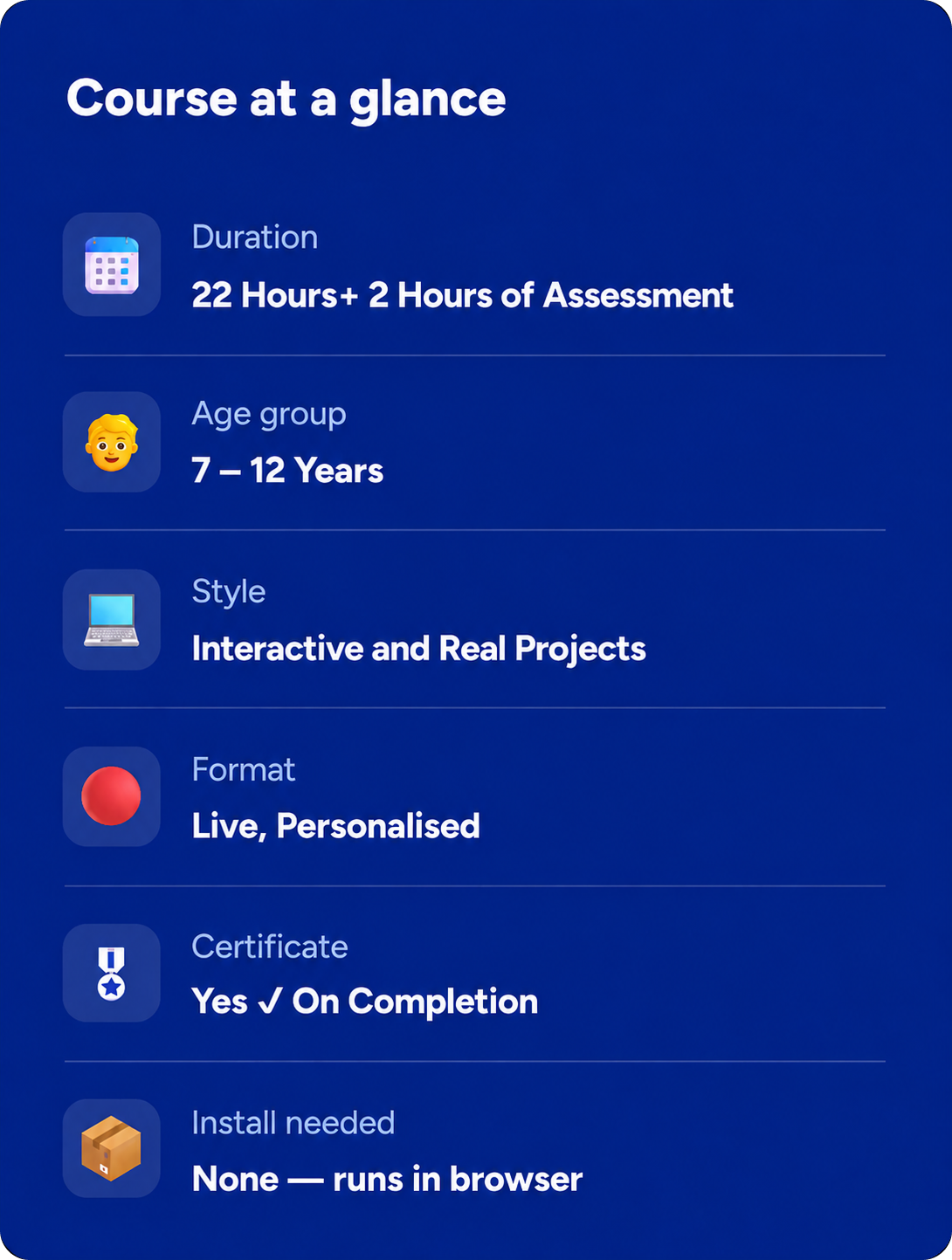
⏱ 22 hrs +2hrs of Assessment
🔴 Live, Personalized
📱Interactive and Real Projects
🎖 Certificate On Completion
Rated 4.8/5
on TrustPilot
Rated 4.8/5
on Google
500,000+
Hours of learning
40+
Countries

Junior coder

Ages 7–12
Curriculum Designed By Educators And Technologists Who Worked For Tech Leaders
About Course

What Is This Course About?

Take your child’s coding journey beyond games and animations into the world of real mobile app development. In this hands-on, live personalised course, children learn how to design and build interactive mobile applications using industry-inspired app development concepts - all in a beginner-friendly environment.
This course is ideal for students who have completed a foundational coding program like Scratch or already understand basic programming logic. Instead of repeating the same concepts, children learn how to reapply their coding knowledge in completely new ways by building real mobile applications, interactive tools, utility apps, games, and creative projects.
Book a Free Trial Class
Why This Course?

What Your Child Actually Gains

Real App Development
Learns how real mobile applications are designed, structured, and developed
Problem-Solving Skills
Reapplies coding knowledge from foundational programs into completely new problem-solving environments
Interactive App Creation
Builds interactive mobile apps, utility tools, games, creative applications, and multi-screen projects
Advanced Coding Concepts
Learns advanced beginner coding concepts including variables, functions, lists, databases, cloud storage concepts, APIs, and queries
Database & Cloud Concepts
Understands how apps store and retrieve data using TinyDB and cloud-inspired database concepts
API & Communication Systems
Learns how APIs work and how modern applications communicate and exchange information
Computational Thinking
Develops computational thinking, structured problem-solving, and app design skills
Project-Based Learning
Learns through project-based learning where every concept is taught using hands-on app creation and real coding challenges
Personalized Learning Support
Personalized learning roadmap, progress feedback, academic guidance, confidence building, and course completion certification
Why ItsMyBot

What Will Your Child Build?

A real interactive mobile app with buttons, images, and screen navigation

A Talking App with sounds, media, and user interaction

A Pedometer App using mobile device sensors

A Gallery & Wonders App with scrolling layouts and dynamic screens

A Paint & Photo Booth App using camera and drawing canvas features

A To-Do List App with database storage and data management

A Multi-Screen Quiz App with score tracking and navigation

Mobile mini-games like Balloon Pop and Rock-Paper-Scissors

A final complete custom app project designed by your child

Note: Exact projects may vary based on your child's pace, creativity, and coding background. Instructors personalise project pathways to keep children challenged, motivated, and engaged.
Course Curriculum

25 structured modules + 2 Hours Assessment

22 Hrs of live instruction. Each module builds on the last.

Modules 1–5

Module 1: Introduction to Mobile App Development

  • Understanding mobile applications
  • Introduction to app development platform
  • Buttons and user interactions
  • Text-to-speech functionality
  • Working with images in apps
  • Basic app design concepts
  • Interactive welcome application
  • Mini app-building activity

Module 2: Adding Media & User Inputs

  • Working with labels and textboxes
  • Adding sounds and audio effects
  • Image components in applications
  • User interaction through inputs
  • Designing interactive interfaces
  • Multimedia app activities
  • Sound-based mini projects
  • UI customization practice

Module 3: Designing App Layouts

  • Understanding layouts in mobile apps
  • Arranging buttons and components
  • Vertical and horizontal layouts
  • Screen organization techniques
  • Responsive interface design
  • Creating organized app screens
  • Basic UI design activities
  • Layout-based mini project

Module 4: Tables, Authentication & Screens

  • Working with tables in apps
  • Creating multiple screens
  • Introduction to login systems
  • Authentication screen design
  • Navigation between screens
  • User-friendly app interfaces
  • Data display activities
  • Multi-screen app project

Module 5: Variables & Smart Data Handling

  • Understanding variables in apps
  • Storing user data
  • Dynamic app behavior
  • Updating values in applications
  • User-based interactions
  • Score and counter systems
  • Smart data activities
  • Variable-based mini projects

Modules 6–10

Module 6: Control Statements & App Logic

  • Introduction to conditions in apps
  • If–Else logic systems
  • Decision-making applications
  • Interactive control flows
  • User response handling
  • Logic-based game activities
  • Smart automation programs
  • Coding challenge activities

Module 7: Date Pickers & Advanced Variables

  • Working with date picker tools
  • Calendar-based applications
  • Managing dynamic variables
  • Scheduling and reminder systems
  • Interactive user input activities
  • Date-based mini apps
  • Smart organizer projects
  • Productivity app concepts

Module 8: Shopping Cart & Calculator Apps

  • Building calculator applications
  • Shopping cart functionality
  • Arithmetic operations in apps
  • User transaction systems
  • Interactive billing systems
  • Product selection interfaces
  • Cart management activities
  • Functional app projects

Module 9: Pedometer & Sensor-Based Projects

  • Introduction to mobile sensors
  • Understanding pedometer systems
  • Motion and activity tracking
  • Health-based app development
  • Real-world sensor applications
  • Fitness tracker concepts
  • Interactive movement activities
  • Sensor-based project building

Module 10: Diary & Test Results Applications

  • Building personal diary applications
  • Storing notes and entries
  • Designing result management apps
  • Data organization techniques
  • User record systems
  • Interactive productivity apps
  • Personalized mobile projects
  • Mini application showcase

Modules 11–15

Module 11: Lists & Data Collections

  • Understanding lists in app development
  • Storing multiple values
  • Displaying and updating lists
  • List-based application systems
  • Managing collections of data
  • Interactive organizer apps
  • Dynamic list activities
  • Data management mini project

Module 12: Databases & Cloud Storage

  • Introduction to databases
  • Working with CloudDB
  • Saving and retrieving app data
  • Real-time data management
  • User information storage
  • Cloud-connected applications
  • Smart database activities
  • Data-driven app projects

Module 13: Screen Changes & Quiz Applications

  • Navigating between screens
  • Building interactive quiz apps
  • Question and answer systems
  • Score tracking mechanisms
  • Dynamic app transitions
  • Multi-screen application design
  • Educational game activities
  • Quiz-based mini projects

Module 14: Scratch Card Game Development

  • Game design concepts
  • Creating scratch card interactions
  • Random reward systems
  • Interactive game mechanics
  • User engagement activities
  • Reward-based gameplay logic
  • Fun app design projects
  • Game-building challenge

Module 15: Creative Fun Applications

  • Building utility and entertainment apps
  • Interactive design concepts
  • User-friendly mobile experiences
  • Smart app customization
  • Combining multiple app features
  • Creativity-focused coding activities
  • Multi-purpose mini apps
  • Innovation-based projects

Modules 16–20

Module 16: Procedures & Smart Game Logic

  • Introduction to procedures/functions
  • Reusable coding concepts
  • Number guessing game logic
  • Creating custom procedures
  • Organizing app functionality
  • Interactive coding activities
  • Logic-based mini games
  • Function-driven applications

Module 17: Fun Apps & Creative Utilities

  • Designing real-world utility apps
  • Interactive entertainment applications
  • App customization techniques
  • Combining media and controls
  • Smart feature integration
  • Creative coding challenges
  • User-focused app experiences
  • Utility app mini projects

Module 18: Location Tracking Projects

  • Introduction to GPS and location services
  • Building location-based applications
  • Tracking and map concepts
  • Real-world navigation systems
  • Interactive location activities
  • Smart travel-based apps
  • GPS-enabled project building
  • Advanced app interaction concepts

Module 19: Arcade Games & Interactive Entertainment

  • Building arcade-style mobile games
  • Mole Mash game mechanics
  • Balloon Pop game concepts
  • Space Invader gameplay systems
  • Collision detection and scoring
  • Fast-paced interactive experiences
  • Action-based coding activities
  • Entertainment app development

Module 20: Dictionaries & Customer Database Apps

  • Introduction to dictionaries/data mapping
  • Organizing user information
  • Customer database systems
  • Key-value storage concepts
  • Dynamic data retrieval
  • Interactive business-style apps
  • Smart information management
  • Database mini projects

Modules 21–25

Module 21: APIs & External Data Integration

  • Understanding APIs in mobile apps
  • Connecting apps with external services
  • Fetching online data
  • Real-world API applications
  • Interactive internet-based features
  • Smart app communication systems
  • API-driven mini projects
  • Data integration activities

Module 22: JSON Data & Color Applications

  • Introduction to JSON data structures
  • Reading and using JSON information
  • Working with colors in applications
  • Dynamic UI customization
  • Data-driven visual projects
  • Smart design interactions
  • JSON-based activities
  • Creative interface projects

Module 23: Adventure Games & Snow Globe Projects

  • Interactive adventure game design
  • “Get the Gold” gameplay mechanics
  • Snow globe animation projects
  • Interactive object movement
  • Reward systems and challenges
  • Creative visual storytelling
  • Fun game development activities
  • Animated project building

Module 24: Rock Paper Scissors Game

  • Building strategy-based games
  • Random choice systems
  • User vs computer gameplay
  • Score tracking mechanics
  • Interactive decision-making logic
  • Game flow management
  • Competitive app experiences
  • Complete game project

Module 25: Advanced Projects

  • Exploring advanced app components
  • Combining multiple coding concepts
  • Enhancing user experiences
The ItsMyBot Difference

Why Parents Choose Us

Every child learns differently. That's why we combine exceptional educators, personalised guidance, and continuous progress tracking to create a learning experience parents can trust and children enjoy.
Personalized Live Learning
Personalised live learning with dedicated instructors
Structured Learning Pathways
Carefully designed learning pathways based on your child’s coding level and learning pace
Exceptional Educators
Teacher selection rate of just 3% — we work only with exceptional educators
Detailed Progress Reports
Progress reports after every session with detailed academic feedback
Academic Counsellor Support
Academic counsellor discussions after every milestone level
Project-Based Technology Learning
Strong focus on project-based learning and practical technology creation
Flexible Scheduling Options
Flexible scheduling that works around your family routine
Future-Ready Technology Exposure
Exposure to future-ready concepts like APIs, app architecture, databases, and real-world technology systems
Trusted by Parents Worldwide
Rated highly by parents across the globe for personalised coding education
Simple start

How it works

3 Easy Steps to Get Started:

1

Book a free trial

Fill in the form. An academic counsellor will schedule a free session and assess your child's current level and interests.
2

Get a personalised roadmap

Based on the trial, counsellors build a custom learning path - right pace, right projects, right instructor for your child.
3

Build, learn, and earn

Live sessions, progress reports after every class, parent feedback calls, and a certificate on completion. Your child keeps all their projects.
faqs

Get to Know Us Better

This course is designed for children aged 7 to 12 years who already have basic coding exposure or foundational programming understanding.

Basic coding familiarity is recommended. However, based on the trial lesson, instructors and academic counselors can customize the learning pace and strengthen fundamentals wherever needed.

Scratch focuses on coding foundations through animations and games. This course helps students reapply those coding concepts in completely new ways by creating real mobile applications with advanced features and modern app development concepts.

Students learn app design, event handling, variables, databases, APIs, queries, sensors, layouts, screen navigation, data handling, and cloud-inspired application concepts.

Yes! Students build fully functional mobile applications that can run on devices and demonstrate real-world app development logic.

Classes are flexible. You can cancel with prior notice and reschedule later whenever convenient for you.

Book a FREE trial class through the form on this page. Our instructors and academic counselors will assess your child’s current coding level and recommend the most suitable starting point and personalized roadmap.

testimonials

Trusted by Parents like You!

I was extremely happy with the teacher and her approach to my daughter, like a close family teacher.
By Canavady
Rated 5/5
My daughter, Rishika is thoroughly enjoying the learning experience at ItsMyBot.

Ms. Poornima is teaching the program very well, at the right pace, making sure Rishika understands the concepts well. During the feedback session, she provided the details of Rishika’s strengths and areas of improvement giving me the confidence that she is well aware of how to guide her holistically.

The daily class reports and feedback gives a clear understanding of the progress in each class.

I also appreciate the excellent coordination, hassle free class scheduling and timely response to queries by Sandhya.

I would definitely recommend ItsMyBot to my friends and family.
By rehana
Rated 5/5
Enrolling my son in classes in September has been a great decision. The trial class helped us identify his interests, and Ms. Jiya's engaging approach has made learning enjoyable. I appreciate her encouragement for my son to draw and write, recognizing it as a positive habit for his development.

The flexibility of classes is a significant advantage, accommodating our unpredictable schedule. Ms. Jiya's understanding and willingness to reschedule when needed make the learning process enjoyable for both my son and us as parents.

I'm grateful for the positive environment Ms. Jiya creates, and we look forward to more enjoyable learning experiences. Kudos to the iTSMYBOT team for their exceptional responsiveness and clear lesson reports, contributing to a smooth and enriching educational journey for our son.
By Dimple Jain
Rated 5/5

Rated 4.7 out of 5 based on  65 reviews on Trustpilot

🚀 Hurry! Reserve Your FREE Trial Class Seat Today

Ready to Build Real Mobile Apps?

Book a FREE Trial Class Today! Let your child move from coding basics to creating real-world applications with confidence.
ItsMyBot
Empowering children with the right skills today enables them to drive innovation tomorrow. Join us on this exciting journey, and let's unlock the boundless potential within every child.
© ItsMyBot 2026. All Rights Reserved.