
Updated November 2026 · 14 min read
⚡ Quick Facts
You’ve decided your child should learn coding. Now comes the real decision: which format actually works? Online vs in-person coding classes is one of the most-searched questions US parents ask — and the answer most comparison guides give is frustratingly vague.
The wrong choice wastes six months of your child’s time and anywhere from $500 to $2,000 of your money. It also — more importantly — risks turning your child off coding before they’ve had a real chance at it. A child who spent a year copying templates in a group class and can’t write a function from scratch has a harder time getting interested again than one who never started.
This guide gives you the honest comparison: what each format delivers, where each one falls short, and what the evidence says about outcomes. By the end, you’ll know exactly what to ask before you enroll.
Table of Contents
“Online vs in-person” is a useful shorthand — but it obscures the most important variable. There are actually three distinct formats, and two of them are online. Most comparison guides treat all online coding as one category. That’s the mistake that leads parents to enroll in the wrong thing.
In-person group classes — a physical location, one teacher, 8–20 students. Think weekend coding academies, after-school clubs at school, camp-style coding programmes. The instructor gives shared attention across all students.
Self-paced online platforms — pre-recorded video lessons, auto-graded exercises, gamified points and badges. No live instructor. No one watching what your child types. Examples: Code.org, Scratch.mit.edu (free), Khan Academy, Codecademy, and dozens of paid platforms.
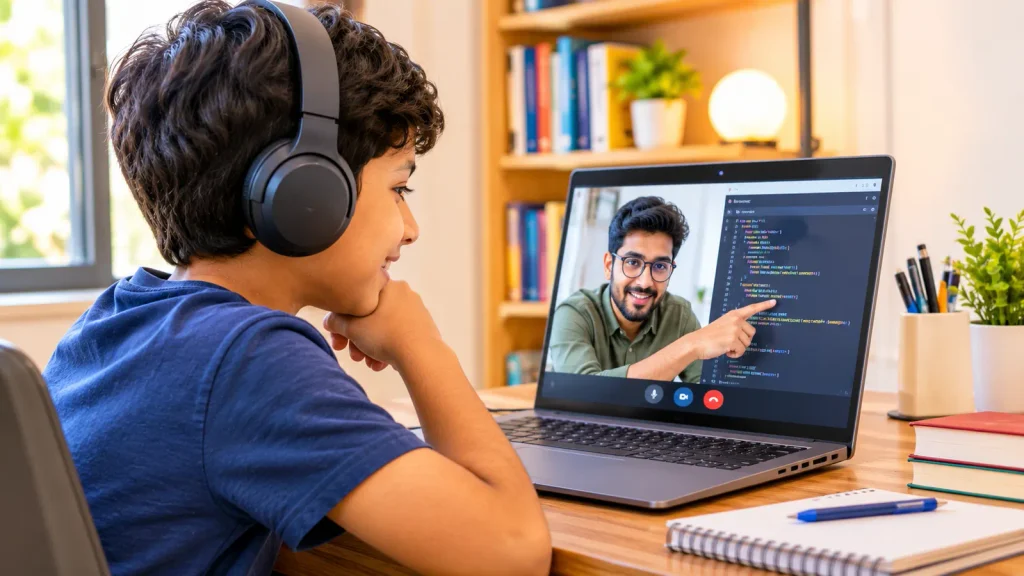
Live 1:1 online classes — a real instructor on video with your child only. Every minute of the session is individual instruction. The mentor watches the code your child writes in real time and corrects errors as they happen. This is the format most different from both alternatives above.
Related: complete parent guide to online coding classes for kids in 2026 and how to choose the right coding course for your child.
Coding is not like most subjects. When a child makes an error writing an essay, the sentence still exists on the page. When a child makes an error writing code, nothing runs — or worse, it runs incorrectly and they don’t know why. The moment of error correction is when almost all learning happens.
In a group of 15 children, one instructor can’t watch all 15 screens simultaneously. Children who are stuck don’t raise their hands — they wait, they copy, or they quietly disengage. Children who are ahead don’t get harder problems — they wait for the group. Both outcomes waste the session.
Here’s how individual attention actually breaks down per format per session:
| Format | Session length | Individual attention | Errors caught in real time |
|---|---|---|---|
| In-person group (15 students) | 60 min | ~4 min | ⚠️ When visible |
| In-person group (8 students) | 60 min | ~7 min | ⚠️ When visible |
| Self-paced online platform | Any | 0 min | ❌ Never |
| Live 1:1 online (ItsMyBot) | 55 min | 55 min (100%) | ✅ Every session |
In-person group coding classes are the most familiar format — and for good reason. They’re visible, social, and structured. Parents can see the facility. Children sit with peers. For introducing coding concepts and building early interest, they do the job.
Here’s the honest breakdown:
✅ Genuine Strengths
⚠️ Real Limitations
Bottom line: In-person group classes are a reasonable introduction for a child aged 6–8 with no prior coding exposure. For building real, transferable skills — the ability to write code from scratch — they’re not the strongest format available.
Self-paced platforms — Codecademy, Khan Academy, Code.org, and dozens of paid alternatives — are the most accessible entry point. Many are free. They’re available on any device, at any time. For a motivated adult learner, they can work well.
For children aged 6–16, the completion data tells the real story. 5–15% of children who start a self-paced coding course complete it. That’s not a quality problem — it’s a format problem. Children are not self-directed learners in the way that adults can be, especially for a subject as abstract as programming.
Why kids don’t finish
Where they genuinely help
Also read: is coding actually helpful for kids? and signs your child is ready for coding.
Live 1:1 online coding sits between the social warmth of in-person and the convenience of self-paced — while outperforming both on the metric that matters most: individual attention and skill development.
The format has one structural advantage that cannot be replicated in a group: the instructor’s entire session is directed at one child’s code. Every question gets answered. Every error gets caught. The pace adjusts in real time — not at the end of a term review, not after the class has moved on.
Real-time error correction. When your child writes for i in range(10): and forgets the colon, the mentor sees it instantly and explains why the colon is there — not next week, not in a red X with no context. The correction and the understanding happen together.
Adaptive pacing by the session. A child who grasps loops quickly moves to functions in the same session. A child who needs more time on conditionals stays there until the concept is solid — without a class of fifteen children waiting. The curriculum serves the child, not the schedule.
Accountability without pressure. A mentor who shows up every week for one child builds a relationship. The child prepares because the mentor will ask what they practiced. That accountability — personal, not institutional — is what sustains engagement past the 6-week mark where most self-paced platforms lose children.
Portfolio outputs from every level. A child building a game in Scratch with a 1:1 mentor builds something they own, can modify, and can show. A child working through Scratch levels on Code.org gets a badge. The difference in what they take away from six months is significant — and visible in university applications, science fair entries, and future employment.
Read more: why Python is the first step to AI for teens and Python for kids — complete guide and best courses.
Here is the complete side-by-side comparison US parents actually need before making a decision.
| Factor | In-Person Group | Self-Paced Online | Live 1:1 Online |
|---|---|---|---|
| Individual attention / session | 4–7 min | 0 min | 45–60 min |
| Real-time error correction | ⚠️ Sometimes | ❌ Never | ✅ Every session |
| Adaptive pacing | ❌ Group pace | ⚠️ Fixed modules | ✅ Session-by-session |
| Completion rate (children) | ⚠️ Moderate | 5–15% | ✅ Highest |
| Portfolio / real projects | ❌ Rare | ❌ Certificates only | ✅ Every level |
| Schedule flexibility | ❌ Fixed time + location | ✅ Anytime | ✅ Flexible booking |
| Commute required | ❌ Yes | ✅ No | ✅ No |
| Parent progress updates | ⚠️ Term reports | ⚠️ Dashboard only | ✅ After every session |
| Works for children with distraction | ⚠️ Variable | ❌ No accountability | ✅ Mentor maintains focus |
| Social / peer interaction | ✅ Strong | ❌ None | ⚠️ Mentor relationship (not peer) |
Cost comparison between formats is only useful if you account for what you get per dollar — not just the headline monthly price. A $180/month group class that produces no portfolio output after six months costs more, effectively, than a $240/month 1:1 programme that produces three working projects in the same period.
| Format | Typical US cost / month | Sessions / month | Individual attention / month | After 6 months |
|---|---|---|---|---|
| Self-paced platform (free) | $0 | Unlimited | 0 min | 85%+ drop-out |
| Self-paced platform (paid) | $15–$40 | Unlimited | 0 min | Most kids inactive |
| In-person group (US average) | $200–$450 | 4 | ~28 min total | Concept awareness; rare portfolio |
| Live 1:1 online (ItsMyBot) | Contact for pricing | 4 | ~220 min total | Real projects + GitHub portfolio |
Format recommendations shift with age and the child’s current relationship with coding. Here’s what the evidence supports:
Ages 6–8 · No prior coding
Best: Live 1:1 online or a high-quality in-person club with small groups (max 6–8 kids). Self-paced platforms fine for supplemental play. Goal at this stage: build interest, not skill — both formats serve that.
Ages 9–12 · Beginning Python
Best: Live 1:1 online. This is the critical stage where text-based coding begins — error correction is essential. Group classes consistently leave children at this age stuck and frustrated. Self-paced platforms are too abstract without guidance.
Ages 12–16 · Intermediate to advanced
Best: Live 1:1 online. Portfolio, data projects, and AI concepts require direct mentorship. A motivated teen can supplement with self-paced resources — but the structured 1:1 sessions are what produce university-ready work.
Ages 16–18 · Self-directed
Flexible: Motivated 16–18-year-olds can use self-paced platforms effectively for specific skills. Live 1:1 remains the strongest format for complex projects, ML work, and portfolio-grade output. Hackathons and Kaggle should complement — not replace — structured instruction.
Related: AI for kids — complete 2026 parent guide, robotics for kids — complete guide, and complete guide to Scratch coding.
These are the patterns we see most consistently in parents who’ve switched to ItsMyBot after a previous programme didn’t work.
❌ Mistake 1: Choosing by name recognition, not by format
Why it’s a problem: A well-known coding brand running group classes still has the group-class attention problem. Brand recognition says nothing about how much of the session your child actually gets.
✅ Better approach: Ask one question — “how many students are in each session?” If the answer is more than one, your child is in a group class regardless of the brand.
❌ Mistake 2: Treating a free platform as an ongoing programme
Why it’s a problem: Code.org and Khan Academy are excellent for initial exposure and concept introduction. They are not designed to take a child from Scratch to Python to AI over two years. Using them as the primary programme produces the 5–15% completion problem.
✅ Better approach: Free platforms are supplementary tools. Use them for exploration and practice between sessions with a live instructor.
❌ Mistake 3: Enrolling by age, not by readiness
Why it’s a problem: An 11-year-old placed in a class designed for 9-year-olds because “that’s where the openings were” will disengage in three sessions. An 8-year-old pushed into Python before Scratch foundations are solid will struggle and conclude coding “isn’t for them.”
✅ Better approach: Any quality programme should offer a placement assessment before starting. If they don’t — and they just ask the child’s age — that’s a red flag.
❌ Mistake 4: Measuring progress by enthusiasm, not output
Why it’s a problem: “My child loves going to coding club” is not the same as “my child can write code.” Enthusiasm is a necessary condition — but it’s not sufficient. A child who has attended 20 sessions of a coding club but can’t build a simple quiz app hasn’t progressed — they’ve been entertained.
✅ Better approach: At any point in a coding programme, you should be able to ask your child to open a blank screen and build the last thing they worked on from memory. If they can — they learned it. If they can’t — they followed along.
These questions cut through the marketing language quickly. A quality programme answers them precisely. A vague answer tells you everything you need to know.
Ask About Format
Ask About Outcomes
Ask About Instructors
Ask About Progress
What the Comparison Actually Tells You
The online vs in-person coding debate is answerable — but only once you separate the three formats properly. In-person group classes build interest and work for young beginners. Self-paced platforms supplement instruction but rarely sustain children past six weeks. Live 1:1 online coding produces the strongest outcomes across attention, pacing, portfolio, and completion rate.
The key takeaways: ask how much individual attention your child gets per session; ask what they’ll build, not what they’ll learn; and use the free trial to see the difference in a single session before committing.
Book a free ItsMyBot trial — one live 1:1 session, a real project, and a placement assessment. No commitment required.
The format that gives your child 55 minutes of direct instruction — every session.
Are online coding classes as good as in-person coding classes for kids?
Live 1:1 online coding classes outperform in-person group classes on the factor that matters most: individual attention. A child in a 1:1 session receives 45–60 minutes of direct instruction compared to 4–7 minutes in an in-person group of 15 students. “Online vs in-person” is less important than “1:1 vs group.”
What is the best coding class format for a child who gets distracted easily?
Live 1:1 online is the strongest format for easily distracted children. A mentor is watching the screen every minute — there’s no way to drift unnoticed. Group classes and self-paced platforms both have accountability gaps. In a group, distracted children become invisible; in self-paced, there’s no one to notice at all.
Why do most kids quit self-paced coding platforms?
Self-paced platforms have a 5–15% completion rate among children because they lack two things children need: accountability and real-time help. When a child gets stuck on a concept, a red X and a retry button don’t explain what went wrong. Without a person to ask, confusion builds into frustration — and frustration leads to quitting.
How much do in-person coding classes cost in the US compared to online?
In-person group coding academies in the US average $200–$450/month for four sessions. Live 1:1 online programmes vary — but the individual attention per dollar is significantly higher in a 1:1 format. Self-paced platforms range from free to $40/month, but their completion data makes them a cost-inefficient choice for most children as a primary programme.
Can my child learn real coding skills in an online class?
Yes — in a live 1:1 online class with a real instructor. The determining factor is not online vs in-person; it’s whether your child has a specialist mentor watching their code in real time. ItsMyBot students build Python programs, data projects, AI models, and mobile apps using the same tools professional developers use — all through live online sessions.
What’s the difference between a live online coding class and a pre-recorded one?
A live online class has a real instructor watching your child’s screen in real time — questions are answered immediately, errors are corrected as they happen, and the session adapts to what your child specifically needs. A pre-recorded class is a video your child watches. The instructor cannot see their code, answer their questions, or notice when they’re stuck. For children, the live format produces significantly better outcomes.
Is there a free trial to try live 1:1 online coding?
Yes. ItsMyBot offers a free trial class — a full live 1:1 session with a specialist mentor, a real project, and a skills placement assessment. No payment details required upfront. It’s the fastest way to see, in one session, the difference this format makes compared to a group class or a self-paced platform.

Online coding, AI, and robotics classes that help kids ages 5–16 build real skills — and confidence — one project at a time.
No commitment · Live class with an expert teacher
© ItsMyBot 2026. All Rights Reserved.