
Have you ever felt limited while working on your Scratch projects? You’re not alone. In my 15 years of teaching coding to kids, I’ve watched countless young programmers hit the same wall – they want to create something amazing, but Scratch’s default blocks just aren’t enough. That’s where Scratch extensions come to the rescue.
Think of Scratch extensions like adding superpowers to your favorite video game character. Just as those power-ups unlock new abilities and possibilities, extensions expand what you can do in Scratch beyond the basic programming blocks. Whether you want to connect to the internet, control hardware, or add artificial intelligence to your projects, extensions make it possible.
In this comprehensive guide, you’ll discover everything about Scratch extensions – from the basics of what they are to advanced techniques for creating your own. By the end, you’ll have the knowledge to transform ordinary projects into extraordinary interactive experiences that captivate and inspire.
Scratch extensions are additional code libraries that integrate seamlessly with the Scratch programming environment, providing new blocks and functionality beyond the standard toolkit. Unlike the core blocks you’re familiar with – motion, looks, sound, and events – extensions offer specialized capabilities that connect your projects to the real world.
Extensions serve as bridges between Scratch’s visual programming language and external technologies. They transform abstract coding concepts into tangible interactions, making programming more engaging and relevant to today’s digital landscape.
The beauty of extensions lies in their accessibility. You don’t need to understand complex programming languages or write lengthy code snippets. Instead, extensions present their functionality through familiar drag-and-drop blocks that maintain Scratch’s user-friendly approach while unlocking professional-level capabilities.
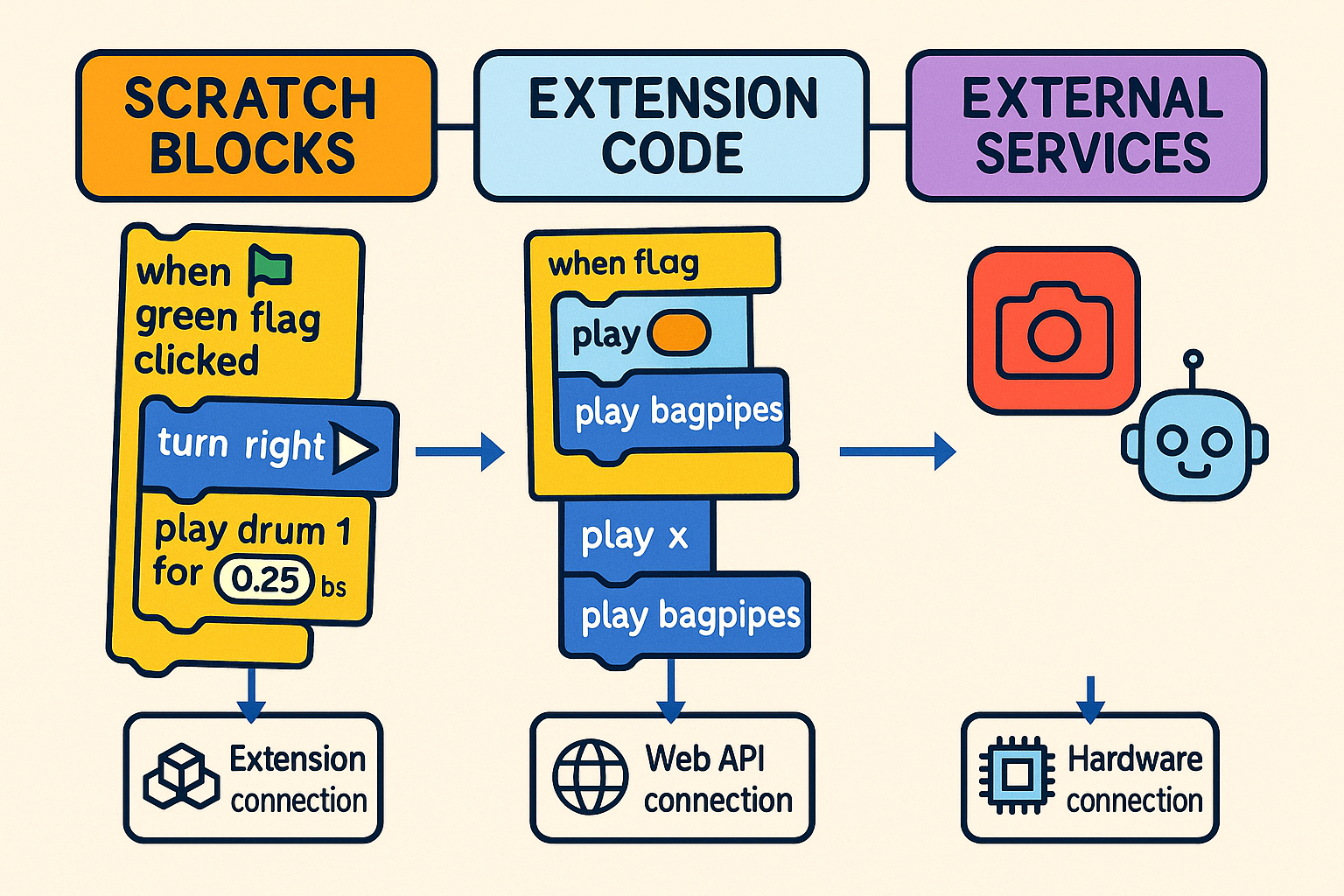
When you add an extension to Scratch, you’re essentially importing a pre-built library of functions. These libraries communicate with external APIs, hardware devices, or software services through JavaScript code that runs invisibly in the background. The extension creates a bridge between Scratch’s block-based environment and these external systems.
Scratch extensions fall into several distinct categories, each serving different programming needs and learning objectives. Understanding these categories helps you choose the right tools for your projects.
Hardware extensions connect your Scratch projects to physical devices, bringing your digital creations into the real world. The most popular hardware extensions include:
micro:bit Extension: This powerful extension connects to the BBC micro:bit microcontroller, enabling you to read sensor data, control LED displays, and respond to button presses. Perfect for robotics projects for kids, this extension makes physical computing accessible.
LEGO Education Extensions: Multiple extensions support LEGO robotics kits, including SPIKE Prime and MINDSTORMS. These extensions control motors, read sensors, and coordinate complex robotic movements through simple Scratch blocks.
Arduino Extensions: For more advanced users, Arduino extensions enable connection to custom electronics projects, opening possibilities for home automation, environmental monitoring, and interactive art installations.
These extensions break down the walls between your Scratch project and the wider digital world:
Text-to-Speech Extension: Converts written text into spoken words, making projects more accessible and enabling voice-guided tutorials or storytelling applications.
Translate Extension: Integrates with Google Translate to provide real-time language translation, perfect for creating multilingual educational content or global communication tools.
Video Sensing Extension: Uses your computer’s camera to detect motion, enabling gesture-controlled games and interactive installations that respond to user movements.
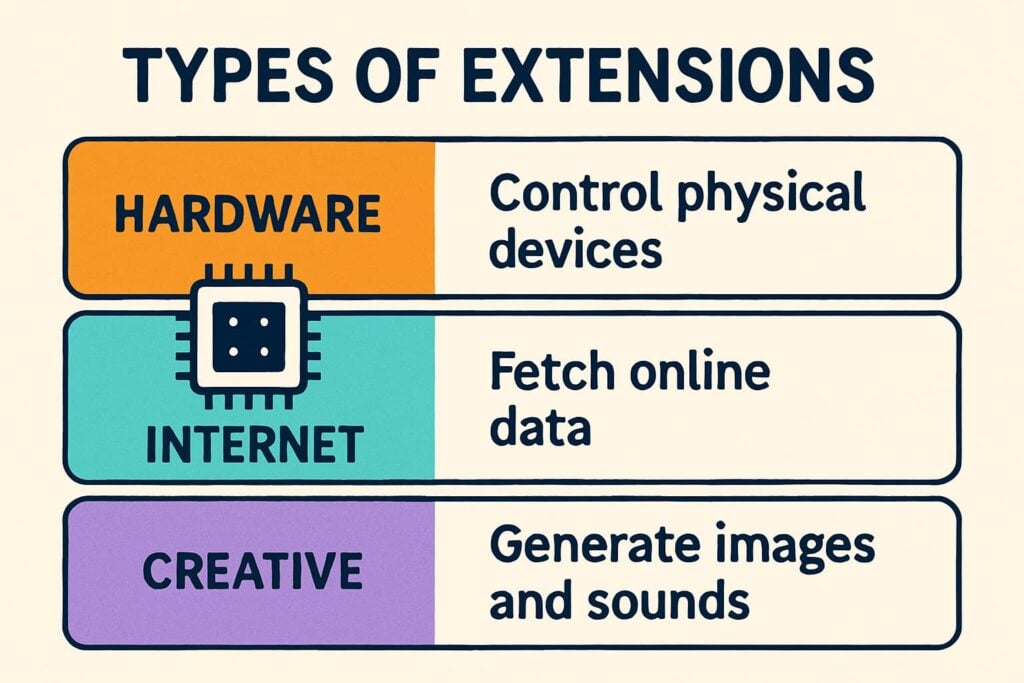
Multimedia extensions expand Scratch’s creative possibilities:
Music Extension: Provides advanced musical composition tools beyond basic sound blocks, including the ability to create music players in Scratch with sophisticated audio controls.
Pen Extension: Offers advanced drawing capabilities, perfect for creating generative art, mathematical visualizations, and custom graphics that go far beyond Scratch’s basic sprite system.
Image Effects Extension: Adds professional-level image manipulation capabilities, allowing for dynamic visual effects and real-time image processing.
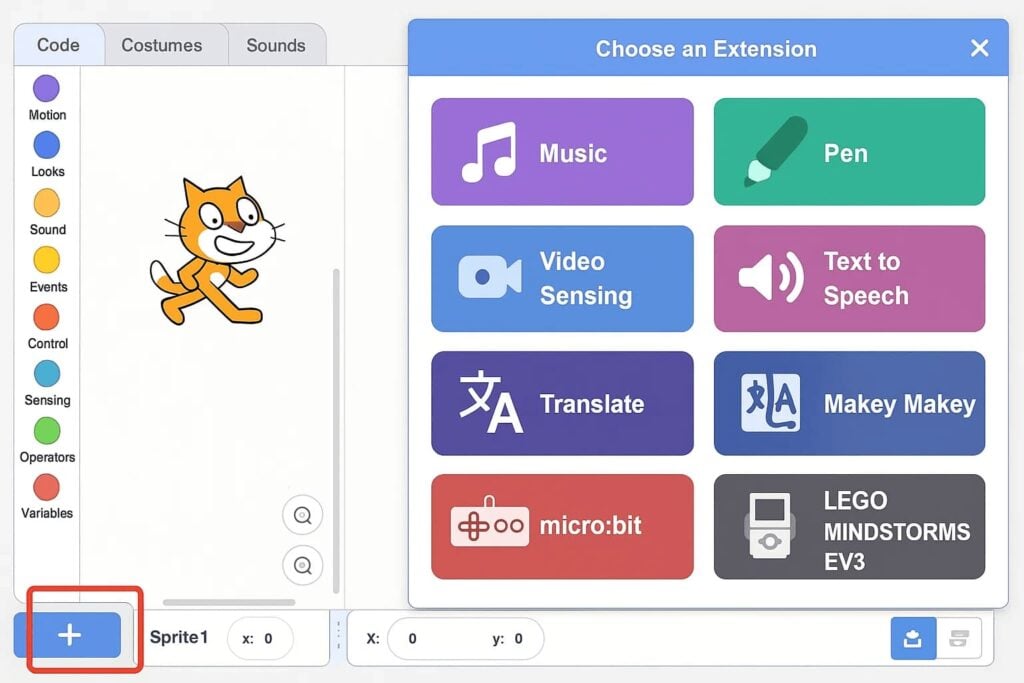
Adding extensions to your Scratch projects is surprisingly simple, though the exact process depends on which version of Scratch you’re using. Here’s a step-by-step guide for both online and offline versions.
The process takes less than 30 seconds, and the extension blocks immediately become available for use in your project.
For Scratch 3.0 offline mode, the process is nearly identical:
Not all extensions work in every environment. Internet-dependent extensions like Translate require an active connection, while hardware extensions need specific devices connected to your computer. Always check extension requirements before starting a project.
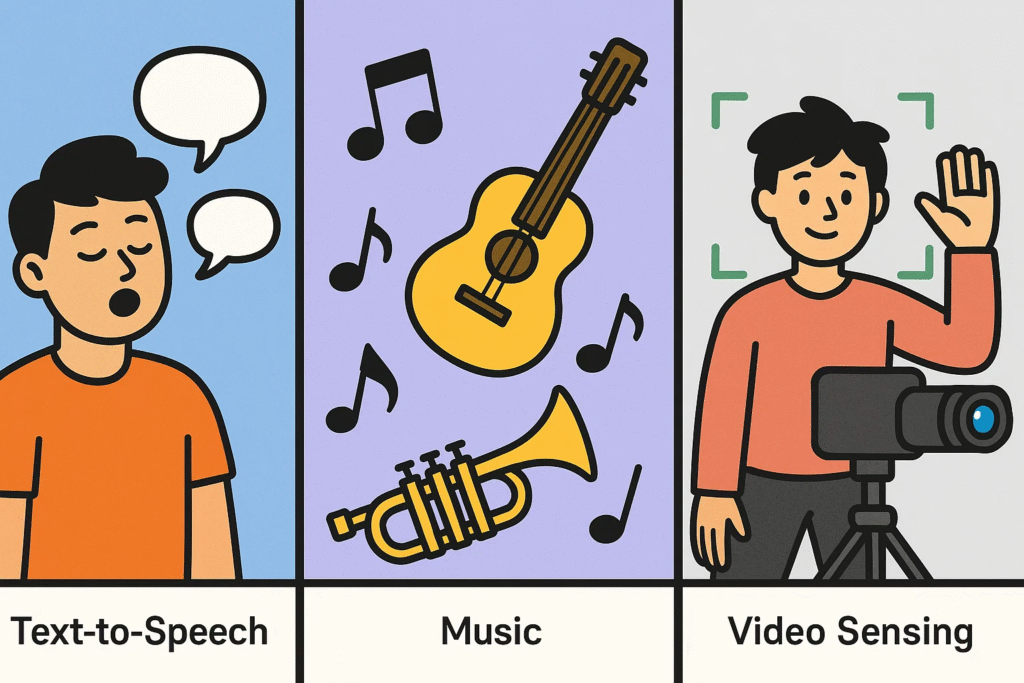
Starting with the right extensions can make the difference between frustration and excitement in your coding journey. These beginner-friendly extensions offer immediate gratification while teaching important programming concepts.
The Text-to-Speech extension transforms any text into spoken words, making it perfect for storytelling projects, educational content, and accessibility features. I’ve seen kids light up when their Scratch characters suddenly start talking!
Practical Applications:
Key Blocks:
Beyond basic sound blocks, the Music extension provides professional-level composition tools. Students can create complex musical arrangements, learn about rhythm and melody, and even develop their own music applications.
Creative Possibilities:
The Video Sensing extension uses your computer’s camera to detect movement, enabling gesture-controlled interfaces and interactive installations. It’s like having a motion sensor built into every project.
Exciting Project Ideas:
As your skills develop, advanced extensions unlock professional-level capabilities that rival traditional programming environments. These tools enable sophisticated projects that demonstrate real-world programming concepts.
Artificial intelligence extensions bring cutting-edge technology into Scratch, making AI concepts accessible to kids. The Machine Learning for Kids extension, developed by IBM, enables image recognition, text classification, and predictive modeling through visual blocks.
AI Project Possibilities:
Learning Benefits:
Students gain exposure to machine learning concepts without complex mathematics or programming syntax. They learn about training data, model accuracy, and algorithmic thinking through hands-on experimentation.
Internet of Things (IoT) extensions connect Scratch projects to smart devices and environmental sensors. These extensions transform programming from screen-based activities into real-world problem-solving tools.
Real-World Applications:
Advanced extensions enable connection to external databases and web services, bringing dynamic data into Scratch projects. Students learn about data management, API integration, and network programming through visual interfaces.
Professional Skills Development:
For advanced users ready to push Scratch’s boundaries, creating custom extensions opens unlimited possibilities. While this process requires JavaScript knowledge, the rewards justify the learning investment.
Custom extensions use Scratch’s extension protocol to communicate between your JavaScript code and the Scratch environment. The process involves defining new blocks, implementing their functionality, and packaging everything for distribution.
Development Requirements:
Several frameworks simplify extension development:
TurboWarp Extension Format: Provides a streamlined approach to extension development with extensive documentation and community support.
Scratch Extension Protocol: The official method for creating extensions, offering maximum compatibility but requiring more technical knowledge.
Once you’ve created an extension, sharing it with the community involves:
Effective extension use requires strategic thinking and understanding of their impact on project performance and compatibility.
Extensions add complexity to your projects, which can affect performance on older devices or slower internet connections. Follow these optimization strategies:
Resource Management:
Code Organization:
Successful extension-based projects require thoughtful planning:
When working with team members or sharing projects publicly:
Even experienced Scratch users encounter challenges when working with extensions. Understanding common issues and their solutions saves time and frustration.
Network-dependent extensions often face connectivity issues:
Symptoms:
Solutions:
Physical device connections present unique challenges:
Common Issues:
Troubleshooting Steps:
Different web browsers handle extensions differently:
Best Practices:
Sometimes extensions fail to load properly:
Diagnostic Approach:
The extension ecosystem continues evolving, driven by technological advances and educational needs. Understanding these trends helps you prepare for upcoming opportunities.
Several cutting-edge technologies are being integrated into Scratch extensions:
Augmented Reality (AR): Extensions enabling AR experiences through web browsers are in development, allowing students to overlay digital content onto real-world environments.
Virtual Reality (VR): VR extensions will enable immersive 3D experiences, transforming how students learn about spatial relationships and 3D programming concepts.
Blockchain and Cryptocurrency: Educational extensions introducing blockchain concepts through visual programming are emerging, teaching students about distributed systems and digital economics.
Extensions are becoming more sophisticated in supporting diverse learning styles:
Adaptive Learning: Extensions that adjust difficulty based on student performance are being developed, personalizing the learning experience.
Collaborative Features: New extensions enable real-time collaboration between students working on shared projects from different locations.
Assessment Integration: Extensions that automatically assess student progress and provide feedback are being integrated into classroom management systems.
The Scratch extension community is rapidly expanding:
Open Source Movement: More extensions are being developed as open-source projects, enabling community contributions and faster innovation.
Educational Partnerships: Schools and educational organizations are investing in custom extension development for specific curriculum needs.
Industry Collaboration: Technology companies are creating extensions that introduce students to their platforms and tools.
Yes, Scratch extensions available through the official library undergo review for child safety. However, always supervise children when they’re using extensions that connect to the internet or external devices.
Absolutely! You can add multiple extensions to a single project. However, be mindful of performance impacts and compatibility between different extensions.
Extension support varies by platform. The official Scratch app for tablets supports some extensions, but hardware-dependent extensions typically require desktop versions.
Currently, Scratch doesn’t provide a direct way to remove extensions. You can delete all blocks from that extension, but the extension library remains available in your project.
Most Scratch extensions are completely free. However, some extensions that connect to external services might require paid accounts for those services.
Scratch extensions transform basic programming concepts into powerful, real-world applications that inspire and educate. From simple text-to-speech functionality to complex machine learning implementations, extensions bridge the gap between beginner-friendly visual programming and professional development capabilities.
As you’ve learned throughout this guide, extensions serve multiple purposes: they maintain Scratch’s accessibility while introducing advanced concepts, they connect digital projects to physical reality, and they prepare students for more sophisticated programming environments. Whether you’re a teacher looking to enhance your STEM curriculum, a parent supporting your child’s coding journey, or a student eager to expand your programming toolkit, extensions offer pathways to deeper learning and more engaging projects.
The key to success with Scratch extensions lies in thoughtful selection and strategic implementation. Start with simple extensions that solve specific problems in your projects, gradually building toward more complex integrations as your confidence grows. Remember that every professional programmer once started with basic tools and concepts – extensions simply provide a more direct path from beginner experiments to advanced applications.
Looking ahead, the extension ecosystem will continue expanding, offering even more exciting possibilities for creative expression and technical learning. By mastering extensions now, you’re preparing for a future where the boundaries between visual programming and professional development continue to blur.
Ready to transform your Scratch projects with extensions? Start by exploring the types of blocks in Scratch to build a solid foundation, then experiment with one extension that excites you. Before you know it, you’ll be creating projects that amaze both yourself and others with their sophistication and real-world relevance.
Take Action: Download our free Scratch Extensions Starter Kit, complete with project templates, tutorial videos, and troubleshooting guides to accelerate your extension mastery journey!
Want your child to go further? Explore ItsMyBot’s Little Coder — structured coding courses designed for kids!

Online coding, AI, and robotics classes that help kids ages 6–18 build real skills — and confidence — one project at a time.
No commitment · Live class with an expert teacher
© ItsMyBot 2026. All Rights Reserved.