
Your child keeps talking about Roblox. Maybe they’ve mentioned wanting to ‘make their own game.’ You’re not entirely sure what that means — or whether it’s a good use of their time.
Here’s the truth: Roblox Studio is one of the most accessible and genuinely educational game-design tools available for children today. And for parents who care about their child’s future in technology, it’s worth understanding properly.
This guide explains exactly what Roblox Studio is, what your child learns by using it, how it compares to other tools like Scratch, and — most importantly — how it connects to the bigger world of coding and robotics education.
Roblox Studio is the free game-development platform that powers the Roblox ecosystem. It’s the tool that creators use to build the games and worlds that millions of players explore on the Roblox platform every day.
For children, Roblox Studio is a safe, visual entry point into real 3D game design and programming. Unlike simply playing a game, using Roblox Studio means your child is on the other side — building the experience.
This is not a toy. It’s a simplified but genuinely powerful creative tool — and children take it seriously because they can share what they build with their friends.
➤ Roblox Coding Course for Kids at ItsMyBot
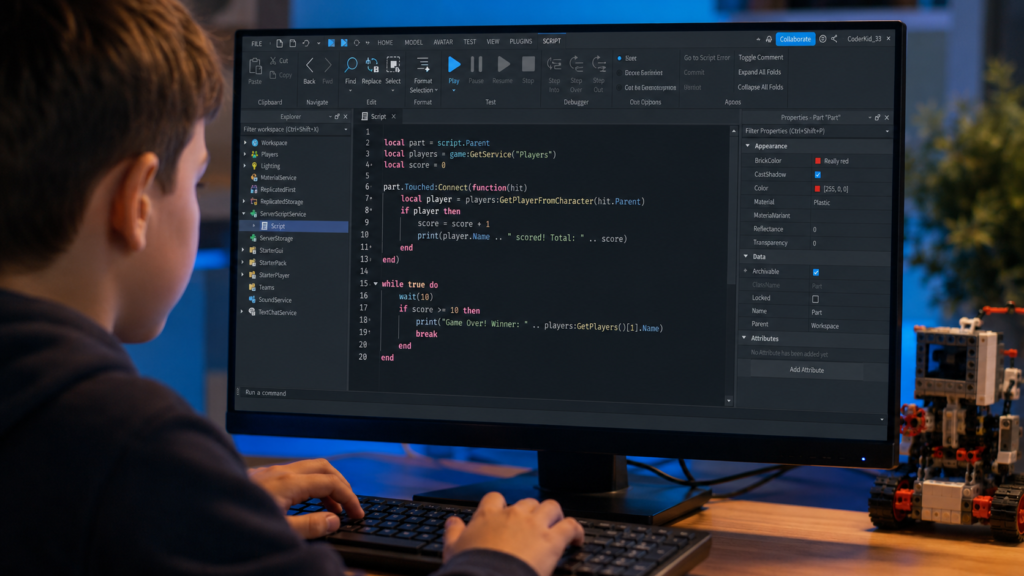
Roblox Studio uses Lua as its scripting language. Lua is a lightweight but fully functional programming language — the same language used by professional game developers globally. For children, this means they’re not learning ‘baby code.’ They’re learning real programming syntax and logic.
Beyond coding, children develop spatial reasoning, design thinking, and project management skills. Building a game from idea to playable experience requires planning, testing, and iterating — exactly the process used by professional developers.
➤ Guide to Scratch Coding for Kids | Best Scratch Coding Games
This is the question every parent should ask — and it deserves a clear, honest answer.
Roblox Studio itself is a local development tool. When your child is building a game in Roblox Studio, they’re working on their own computer — not interacting with other users. The safety concerns around Roblox relate to the social platform (the games), not the creation tool.
The creation side — Roblox Studio — is genuinely a safe, productive environment for children to explore coding and game design.
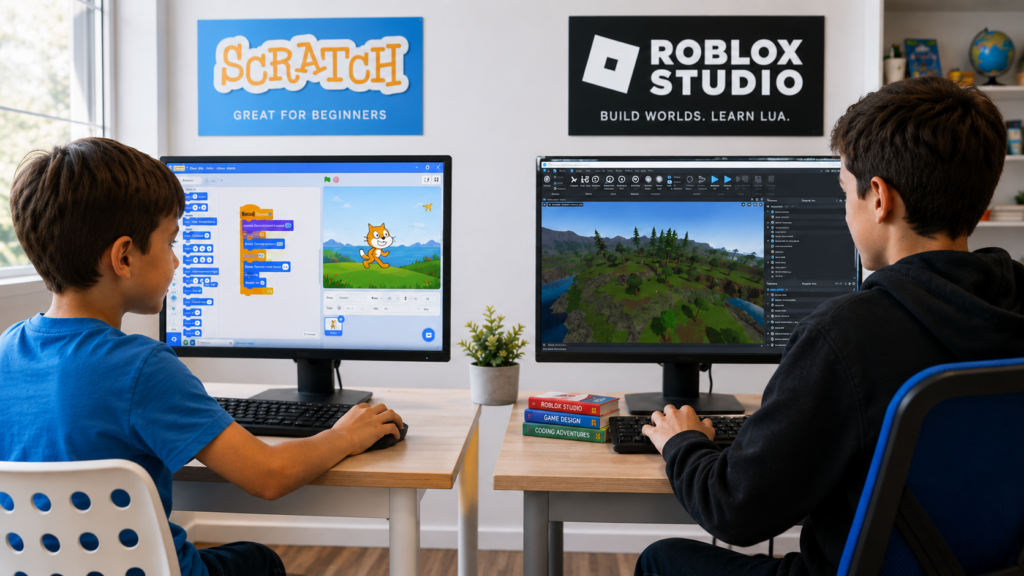
If your child has already explored Scratch, you might be wondering how Roblox Studio compares. Both are excellent tools — but they serve different stages of a child’s coding journey.
| Scratch | Roblox Studio | |
|---|---|---|
| Coding language | Block-based (no syntax) | Lua (real text-based code) |
| Best for | Ages 5–10, complete beginners | Ages 8–14, ready for real coding |
| Output | 2D animations and stories | 3D games and interactive worlds |
| Learning step | Entry-level foundation | Intermediate bridge to Python/JS |
| ItsMyBot course | Scratch beginners pathway | Roblox coding course |
Most ItsMyBot students start with Scratch, build confidence with foundational coding concepts, and then progress naturally to Roblox Studio — before moving on to Python, robotics, and AI.
This is the part that parents often don’t realise: the skills your child builds in Roblox Studio are directly transferable to robotics programming.
Both disciplines require the same core thinking — breaking a complex problem into logical steps, writing instructions a machine can follow, and testing and debugging when things don’t work as expected. The language changes, but the mindset is identical.
Think of Roblox Studio as a gateway. Once your child can think like a programmer, transitioning to robotics hardware is a natural and exciting next step.
➤ Robotics for Kids: Complete Guide + Best Learning Programs | Artificial Intelligence in Robotics
If you’d like your child to learn Roblox Studio in a structured, mentor-guided environment, ItsMyBot’s Roblox coding course is designed specifically for beginners — with clear milestones and real project outcomes.
➤ Roblox Coding Course for Kids at ItsMyBot
Roblox Studio is a brilliant starting point. But the journey doesn’t stop there.
Once your child has a grasp of coding logic and creative problem-solving, robotics opens up an entirely new dimension of learning — where code connects to the physical world. Robots move, respond, and interact with their environment. And the engineers who build them use skills your child is already starting to develop.
At ItsMyBot, we guide children through this journey — from their first Roblox script to their first fully programmed robot. Every step is designed to build confidence, capability, and curiosity.
➤ Explore ItsMyBot’s STEM Robotics Courses
➤ From Scratch to Success: How Robotics and Coding Ignite Children’s Potential
Roblox Studio is best suited to children aged 8 and above. Younger children can explore it with parental guidance, but the Lua scripting language and 3D development environment become much more accessible once children are comfortable with reading and basic logical thinking around age 8–9.
Yes. Roblox Studio uses Lua, a professional scripting language used in real game development. The coding concepts children practise — variables, loops, functions, events — are identical to those used in Python, JavaScript, and other industry-standard languages. It’s a genuinely educational tool, not just a game.
Yes. Roblox Studio is completely free to download and use. There are no subscription fees or in-app purchases required to create and develop games.
Playing Roblox means experiencing games that others have created. Roblox Studio means creating those games yourself. It’s the difference between watching a film and directing one. Roblox Studio puts your child in the role of creator, designer, and programmer — not just player.
The skills children develop — programming logic, design thinking, debugging, problem-solving — are directly applicable to careers in software development, game design, AI engineering, and robotics. Many professional game developers started exactly this way.
Millions of kids play Roblox every day. The ones who learn Roblox Studio don’t just play — they create. And the ones who take that next step into structured coding and robotics? They build futures.
ItsMyBot’s Roblox coding course is designed for children aged 8–14 — structured, mentor-guided, and built around real project outcomes your child can show off with pride.
From game designer to robotics builder — the journey starts with one class.
Book a Free Demo Class → Let your child try a session with a real mentor before you commit to anything. It takes 30 minutes. The excitement lasts much longer.
Get Started with the Roblox Coding Course → Enrol today and give your child a structured path from Roblox scripting to real-world coding skills.
Already past Roblox? Explore our STEM Robotics Courses and AI Courses for Kids — the natural next step.

Online coding, AI, and robotics classes that help kids ages 6–18 build real skills — and confidence — one project at a time.
No commitment · Live class with an expert teacher
© ItsMyBot 2026. All Rights Reserved.