
| Goal | Best Pick | Price |
|---|---|---|
| Best Overall | Makeblock mBot | ~$90 |
| Best for Ages 6–7 | Nintendo Labo | ~$70 |
| Best Budget | 4M Tin Can Robot | ~$23 |
| Best Premium | LEGO Mindstorms | ~$360 |
| Best for Coding | Sphero Mini | ~$50 |
Every parent eventually faces this: your kid asks about robots, you search online, and you get 50 options and zero clarity.
This guide cuts through that. We’ve reviewed 10+ beginner robotics kits and ranked them by what actually matters to parents – age fit, ease of setup, real learning value, and whether your child will still be using it six months later.
No filler. No sponsored rankings. Just the picks that deliver.
Before we get to the list, here’s what separates kits that collect dust from ones kids actually finish — and come back to.
1. Age-appropriate complexity A kit for a 10-year-old should not be handed to a 6-year-old. The frustration gap is real. Look for kits where the challenge is just slightly beyond your child’s current comfort zone.
2. Fast first win The best kits give kids a working robot in under 90 minutes. If it takes a whole weekend just to get started, most kids tap out before the learning begins.
3. Block coding before text coding For ages 6–10, Scratch-style block coding is the right starting point – it teaches logic without the syntax barrier. Text-based Python or Arduino should come later.
4. Room to grow A kit your child outgrows in two weeks is an expensive mistake. Look for kits with expansion modules, curriculum, or a clear “next level” built in.
5. Build quality that survives a kid Thin plastic shells and flimsy parts don’t last. Kits with aluminum frames or interlocking parts built to LEGO standards will outlast the learning curve.
Based on our extensive testing and analysis of the 2026 market, here are the top recommendations for young engineers and coders.
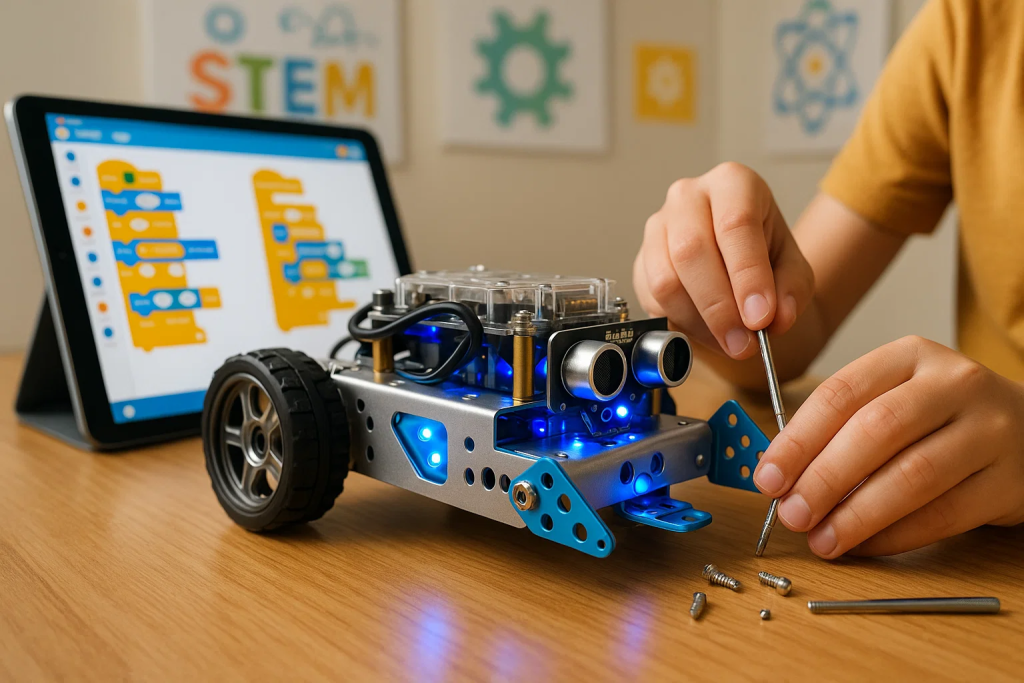
Age: 8+ | Price: ~$90 | Coding: Scratch → Arduino | Assembly Time: ~45 min
If you only read one entry in this list, make it this one.
The mBot has been the most recommended beginner robotics kit for over five years — and in 2026, it still holds that title. It teaches real robotics through a structured path: build it with your hands, control it with Scratch block coding, then graduate to Arduino text code as skills grow.
What makes it stand out:
Honest Considerations: Screw-based assembly may need adult help for kids under 9. Performance can wobble on very rough or uneven surfaces.
Best for: Parents who want a long-term STEM investment, not a one-week novelty.
ItsMyBot Note: Once your child finishes building with the mBot, our Robotics Course is a natural next step — it’s designed to take kids from kit builders to actual coders.
Age: 8+ | Price: ~$50 | Coding: Draw → Block → JavaScript | Assembly Time: 0 min (pre-built)
The Sphero Mini is the rare beginner kit that requires zero assembly and still delivers serious learning.
It’s a rolling ball packed with sensors (gyroscope, accelerometer) controlled through the Sphero Edu app – an app that scales from drawing a path for it to follow, all the way up to JavaScript programming.
What makes it stand out:
Honest Considerations: Easy to lose (it’s small). Thin plastic shell is not designed for rough play. No expansion hardware — growth is software-only.
Best for: Younger kids who need a quick, rewarding entry into coding without the complexity of building.
Age: 6+ | Price: ~$70 | Coding: Visual drag-and-drop (Toy-Con Garage) | Assembly Time: 1–3 hrs per Toy-Con
If your child already has a Nintendo Switch, the Labo Variety Kit is a genuinely unique way to introduce engineering without it feeling like school.
Kids build cardboard “Toy-Con” creations — a fishing rod, a piano, a house, a motorbike — that physically interact with the Switch console. Once built, the “Toy-Con Garage” lets them program custom rules and behaviors using a visual drag-and-drop interface.
What makes it stand out:
Honest Considerations: Cardboard construction won’t survive spills or rough handling. Not expandable beyond additional Labo kit purchases. No progression toward Python, Arduino, or real-world robotics concepts.
Best for: Creative kids ages 6–9 who are gamers — a fun “gateway” to STEM thinking.
Age: 6+ | Price: ~$120+ | Coding: Scratch → Python | Assembly Time: ~30 min
The mBot Neo is the next generation of the mBot, built for 2026 STEM standards. It adds Wi-Fi connectivity, AI-powered features, and a cleaner path from block coding to Python.
What makes it stand out:
Honest Considerations: Higher price than the original mBot. AI features may be ahead of where most 6-year-olds are actually ready to learn — it’s better positioned for ages 8+.
Best for: Parents who want a future-ready kit that teaches AI concepts alongside robotics fundamentals.
Age: 8+ | Price: ~$23 | Coding: None | Assembly Time: ~30 min
The 4M Tin Can Robot is the most accessible entry point on this list — and the most honest. It doesn’t pretend to be more than it is: a simple, mechanical robot built from a repurposed soda can.
What makes it stand out:
Honest Considerations: No programming component. Limited educational depth once the build is complete. Best treated as a first step, not a long-term kit.
Best for: Complete beginners or younger kids getting their first taste of building before moving to a more advanced kit.
Age: 8+ | Price: ~$35 | Coding: None | Assembly Time: Varies per model
For families who want to explore mechanical engineering without spending much, the Sillbird 12-in-1 is excellent value. Kids build 12 different solar-powered models from one set of parts — from rolling vehicles to walking robots.
What makes it stand out:
Honest Considerations: No coding or programming of any kind. Some models work better outdoors (sunlight dependent). Not expandable beyond the 12 included designs.
Best for: Budget-conscious families who want a hands-on, mechanical engineering experience with real-world science concepts.
Age: 8+ | Price: ~$130 | Coding: Block-based (Jimu App) | Assembly Time: 2–3 hrs
The Jimu kit takes a different approach — it’s less about programming and more about building articulated, moving characters that actually walk, express, and respond.
What makes it stand out:
Honest Considerations: Programming depth is more limited compared to mBot or Sphero. Primarily a builder’s kit — coders may feel constrained after a while.
Best for: Kids who are more excited by physical building and movement than by writing code.
Age: 10+ | Price: ~$70 | Coding: C/C++ (Arduino IDE) | Assembly Time: 2–3 hrs
This is where real electronics begin. The Elegoo Smart Car Kit is based on the open-source Arduino platform — the same platform used by engineers, makers, and students worldwide.
What makes it stand out:
Honest Considerations: No block coding — this is text-first, which can frustrate kids who aren’t ready for syntax. Assembly takes patience (2–3 hours). Not suitable for kids under 10.
Best for: Children ages 10+ who are ready to step off block coding and learn the way real engineers do.
Age: 10+ | Price: ~$360 | Coding: Scratch → Python | Assembly Time: Varies (5 models)
The LEGO Mindstorms Robot Inventor is the benchmark premium kit. If your child is serious about robotics and you’re willing to invest, nothing on the market comes close to the depth, flexibility, and engagement this kit delivers.
What makes it stand out:
Honest Considerations: Significant investment. Not a casual kit — best suited for kids who already know they love building and STEM. Discontinued by LEGO (though widely available secondhand and from retailers with stock).
Best for: Children 10+ who are serious about robotics and need a system that won’t hold their skills back.
Age: 8+ | Price: ~$150 | Coding: Draw → Block → JavaScript | Assembly Time: 0 min
The Sphero BOLT is the advanced version of the Sphero Mini — with an 8×8 programmable LED matrix, compass, and light sensor built in. It’s often found in schools for a reason: it scales beautifully from beginner to intermediate coding.
What makes it stand out:
Honest Considerations: Higher price than the Mini with a less dramatic difference in beginner experience. Best value shows at intermediate–advanced coding stages.
Best for: Parents who want room to grow within the Sphero ecosystem, or educators looking for a classroom-grade coding robot.
| Kit | Age | Coding Type | Price | Learning Depth | Assembly Time | Best Feature |
|---|---|---|---|---|---|---|
| Makeblock mBot | 8+ | Block → Arduino | ~$90 | ⭐⭐⭐⭐⭐ | ~45 min | Best overall balance |
| Sphero Mini | 8+ | Block → JS | ~$50 | ⭐⭐⭐⭐ | 0 min | Zero assembly |
| Nintendo Labo | 6+ | Visual drag-drop | ~$70 | ⭐⭐⭐ | 1–3 hrs | Creative + gaming |
| Makeblock mBot Neo | 6+ | Block → Python | ~$120 | ⭐⭐⭐⭐⭐ | ~30 min | AI + Wi-Fi |
| 4M Tin Can Robot | 8+ | None | ~$23 | ⭐⭐ | ~30 min | Best budget pick |
| Sillbird STEM 12-in-1 | 8+ | None | ~$35 | ⭐⭐ | Varies | 12 builds, solar |
| UBTECH Jimu | 8+ | Block (Jimu App) | ~$130 | ⭐⭐⭐ | 2–3 hrs | Animatronics |
| Elegoo Smart Car V3 | 10+ | C/C++ Arduino | ~$70 | ⭐⭐⭐⭐⭐ | 2–3 hrs | Real Arduino coding |
| LEGO Mindstorms | 10+ | Block → Python | ~$360 | ⭐⭐⭐⭐⭐ | Varies | Most versatile system |
| Sphero BOLT | 8+ | Block → JS | ~$150 | ⭐⭐⭐⭐ | 0 min | LED matrix / waterproof |
Not sure which to pick? Answer these three questions:
Q1: How old is your child?
Q2: What matters more — building or coding?
Q3: What’s your budget?
Most beginner robotics kits have a ceiling. Once your child completes the builds and experiments with the included curriculum, the question becomes: what now?
The progression path looks like this:
That’s exactly where ItsMyBot comes in. Our Robotics Course for Kids takes children beyond the kit — into real project-based learning, structured coding curriculum, and hands-on robotics challenges taught by experienced instructors.
If your child has already completed a beginner kit and is hungry for more, a structured course is the next logical step.
👉 Book a Free Trial Class at ItsMyBot
Children as young as 6 can start with beginner-friendly kits like Nintendo Labo or Sphero Mini. For kits that involve assembly and coding, age 8 is typically the sweet spot where kids have the fine motor skills and patience to get real value from the experience.
The best ones do. Kits like the Makeblock mBot, Sphero, and mBot Neo use Scratch (block-based coding) that teaches genuine programming logic — loops, conditionals, sensor input, and motor control. This is the same logic foundation used in Python, JavaScript, and other real languages.
The 4M Tin Can Robot (~$23) is the most affordable kit that still delivers a real learning moment. For under $40 with actual coding, the Sphero Mini is the best value option.
Yes — when chosen correctly. Robotics kits that include coding components consistently develop computational thinking, problem-solving, and STEM interest in children. The key is matching the kit to your child’s age and interest level so they engage with it beyond the first week.
The Nintendo Labo Variety Kit (ages 6+) and Sphero Mini (ages 8+, though manageable at 7 with parent support) are the best options. Both prioritize play and accessibility over complex assembly.
It depends on the child. The LEGO system is familiar and lowers the barrier to building. However, the programming hub and curriculum are better suited to children 10+ who already have some interest in robotics or STEM. For a true beginner at age 8, start with the mBot first.
Block coding (like Scratch) uses visual puzzle-piece commands — no typing required, no syntax errors. It teaches programming logic visually. Text coding (Python, Arduino C++) requires writing actual code, like professional developers do. Most expert educators recommend starting with block coding and transitioning to text coding around age 10–12.
Absolutely. Robotics kits are gender-neutral STEM tools. Kits like Sphero Mini, Nintendo Labo, and UBTECH Jimu have particularly broad appeal because they emphasize creativity, play, and storytelling alongside technical skills.
For most families reading this in 2026, the Makeblock mBot is the right starting point. It’s the best balance of price, educational depth, build quality, and long-term value. It grows with your child — from first-time builder to intermediate coder — without needing to be replaced.
If budget is a concern, start with the Sphero Mini (~$50) for the fastest, most satisfying introduction to coding robotics with zero assembly required.
And when your child is ready to go further — beyond what any kit can teach — ItsMyBot’s structured Robotics Course is the clear next step.
Your child’s next step starts here.
Join 10,000+ kids learning robotics and coding with ItsMyBot — real projects, real skills, real results.
👉 Book Your Free Trial NowLast reviewed and updated: April 2026. Prices listed are approximate retail prices and may vary by retailer.

Online coding, AI, and robotics classes that help kids ages 6–18 build real skills — and confidence — one project at a time.
No commitment · Live class with an expert teacher
© ItsMyBot 2026. All Rights Reserved.