
Reading Time: 7 mins

Imagine your favorite video game controller talking to your TV. Now imagine everything around you—your toys, lights, even your refrigerator—chatting with each other to make life easier. That’s the Internet of Things (IoT)!
IoT systems are networks of physical devices that collect data, share information, and make decisions. Think of it as giving everyday objects a brain and a voice. Your smartwatch tracking steps, smart speakers playing music, or home thermostats adjusting temperature—these are all IoT systems working behind the scenes.
The basic components of an IoT system work like a relay team passing a baton. Each part has a specific job, and when they collaborate, amazing things happen.

Every IoT system needs four essential building blocks to function. Let’s explore each one step by step.
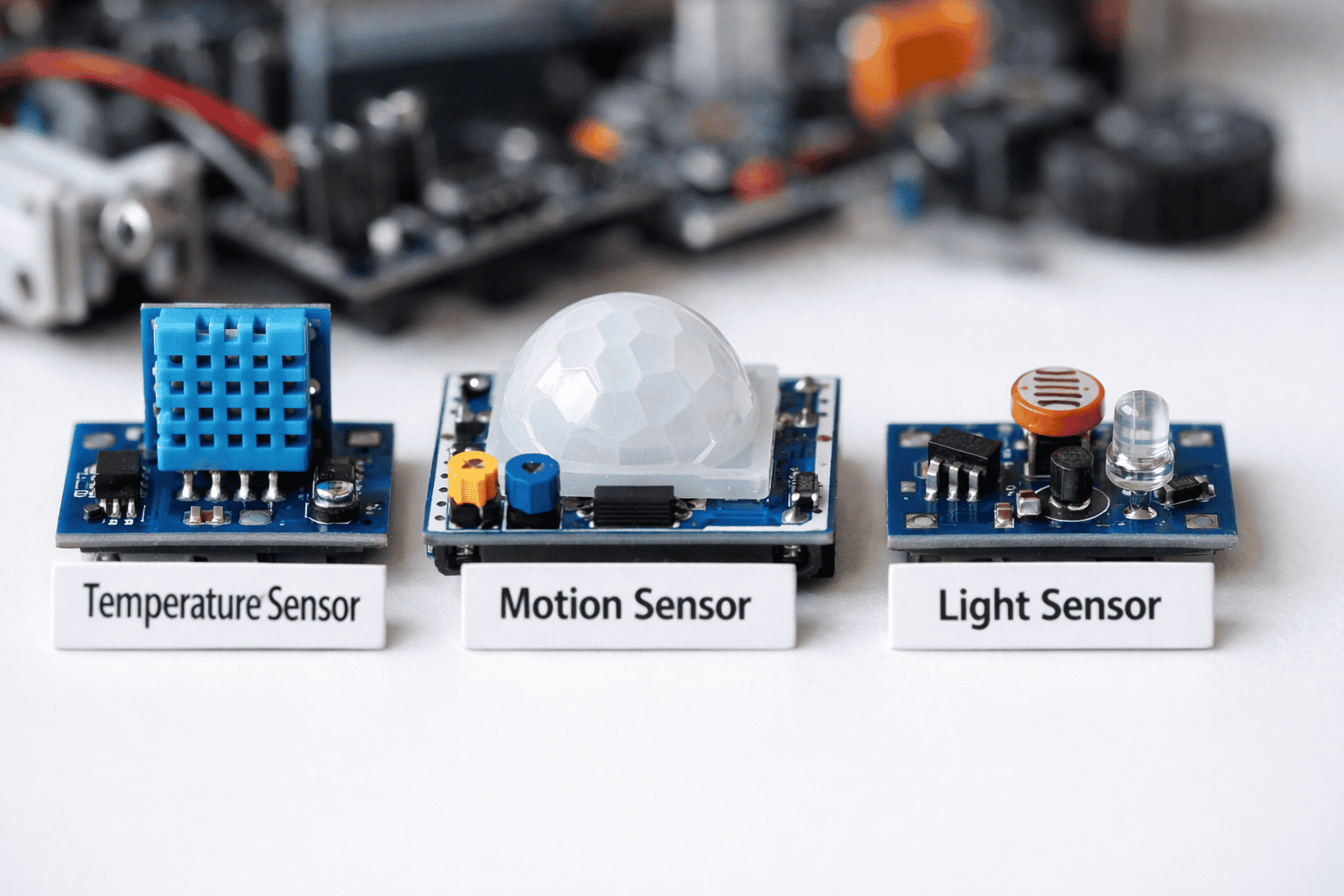
What They Do: Sensors gather information from the world around them. They’re like your senses—seeing, hearing, feeling temperature, or detecting movement.
Common Types Kids Should Know:
Different types of IoT sensors serve specific purposes in various smart devices.
Real Example: When you walk into a room and the lights turn on automatically, a motion sensor detected you and sent that information to the lights. For hands-on projects, explore our guide on building remote-controlled robots which use multiple sensors.
What It Does: This is how devices talk to each other and share the data collected by sensors. It’s the messenger delivering information.
Connection Methods:
Why It Matters: Without connectivity, sensors would collect data but have nowhere to send it. It’s like taking photos but never sharing them with anyone. Proper IoT connectivity ensures devices communicate reliably and securely. Learn more about device communication in our IoT device management guide.
What It Does: This component analyzes all the information gathered by sensors. It decides what to do next based on rules you set.
How It Works:
Kid-Friendly Example: When your smart speaker hears “play music,” it processes your voice, understands the command, and tells the music app what to do. The processing happens in milliseconds!
Kids can start learning these concepts through beginner robotics kits that include simple microcontrollers.

What It Does: This is how you see and control your IoT system. It’s the part you actually interact with—screens, apps, voice commands, or buttons.
Common Interfaces:
Why It’s Important: The user interface makes IoT accessible. Without it, you couldn’t tell your system what to do or see what’s happening.
Here’s the magic—when all four basic components of an IoT system collaborate, they create smart solutions.
Step-by-Step Flow:
Step 1: Sense — Sensors detect something (temperature drops to 65°F) Why it works: Sensors continuously monitor the environment
Step 2: Connect — Data travels through Wi-Fi to the processor Why it works: Connectivity ensures information reaches the right destination
Step 3: Process — The brain decides “turn on heater” Why it works: Processing interprets data and makes intelligent decisions
Step 4: Act — Heater turns on; you see temperature rising on your phone Why it works: The user interface keeps you informed and in control
Step 5: Learn — System remembers your preferences for next time Why it works: IoT systems improve based on patterns
For a deeper understanding of how these layers interact, check out our comprehensive 5-layer architecture of IoT guide.

Learning the basic components of an IoT system becomes exciting when you build your own projects!
Beginner Projects:
Smart Plant Monitor
Motion-Activated Light
Weather Station
These projects teach the fundamentals while building real skills. For more inspiration, explore our robotics science fair projects collection.
Mistake 1: Skipping Sensor Calibration
Mistake 2: Choosing Wrong Connectivity
Mistake 3: Processing Too Much Data Locally
Mistake 4: Ignoring Security
Mistake 5: Poor User Interface Design
Mistake 6: Not Testing Connectivity Range
Student: Maya Rodriguez, 12 years old, San Diego
Initial Challenge: Maya loved gardening but often forgot to water her plants. Her plants would either dry out or get overwatered. “I wanted my plants to tell me when they needed water,” Maya explained.
Solution Implemented: Working with her robotics mentor at ItsMyBot, Maya built a complete IoT system over 8 weeks:
Action 1: Selected soil moisture sensors to detect water levels
Action 2: Connected sensors to Arduino using Wi-Fi module
Action 3: Set up cloud database to store readings
Action 4: Created mobile app interface for notifications
Action 5: Added automatic watering system
Results Achieved:
“Understanding the basic components of an IoT system changed how I see technology,” Maya shared. “Now I know I can build solutions to real problems.”

The basic components of an IoT system include sensors (data collection), connectivity (communication), data processing (decision-making), and user interface (interaction). These four parts work together to create smart, connected devices that improve daily life.
Sensors detect physical changes in the environment—temperature, motion, light, sound, or pressure. They convert these physical observations into electrical signals that microcontrollers can read and process. Think of them as the device’s sense organs.
Wi-Fi is the easiest starting point for kids because most homes already have it. Bluetooth works well for shorter-range projects. As you advance, explore Zigbee for smart home applications. Start simple and add complexity as you learn.
Absolutely! Kids as young as 8 can create basic IoT systems using platforms like Arduino or Raspberry Pi. Start with pre-built kits that teach block-based coding before moving to text-based programming
Begin with visual programming using Scratch or Blockly. Progress to Python, which is perfect for IoT projects. You’ll also learn about data structures, conditional logic, and API integration. Our how to code in Python guide helps beginners get started.
Basic starter kits range from $30-80. Arduino Uno kits ($35) or Raspberry Pi bundles ($50-70) include everything needed for first projects. Many schools and libraries offer free access to these tools through maker spaces.
IoT focuses on connecting everyday objects to the internet for data sharing. Robotics combines IoT components with mechanical parts to create machines that move and perform tasks. Many robotics projects use IoT principles for communication.
Yes, when supervised appropriately. Use low-voltage components (5V or less), avoid working with electrical outlets, and follow safety guidelines. Always work with adult mentors when connecting to networks. Learn about digital safety in our keeping kids safe online guide.
Understanding the basic components of an IoT system opens doors to endless creative possibilities. By mastering sensors, connectivity, processing, and interfaces, young innovators can build solutions that make the world smarter.
Key Takeaways:
The Internet of Things isn’t just about technology—it’s about solving real problems creatively. Every smart home device, wearable gadget, and automated system starts with these four fundamental components working in harmony.
Ready to start your IoT journey? Explore our hands-on coding and robotics programs designed to turn screen time into skill time. Your future as a tech creator begins today.