Reading Time: 11 mins

Your child spends hours on screens every day — but what if that time could build real skills instead of just scrolling? You’re not alone in wanting more from your child’s screen time. Thousands of parents face the same question: how do I choose a coding course that actually works?
Here’s what makes this decision hard. Coding courses promise everything from “future-ready careers” to “fun games,” but most don’t deliver personalized learning that adapts to your child’s pace. Without the right guidance, you risk wasting money on programs that bore or frustrate your child.
This guide shows you exactly how to pick a coding course that turns screen time into skill time — with industry-level instruction, progress tracking, and real results you can see.

The world your child will work in looks nothing like today. By 2030, 85% of jobs that will exist haven’t been invented yet. Coding isn’t just about building apps — it’s about teaching kids how to think, solve problems, and create solutions.
Here’s what coding education gives your child:
Parents who invest in quality coding education report their children show improved academic performance, increased confidence, and genuine excitement about learning. For a deeper dive into why kids should learn coding early, explore our guide on the best age for kids to start coding.
The key isn’t just any coding course — it’s finding one that matches your child’s learning style and grows with them.

Before you compare courses, understand your child. Not every 8-year-old learns the same way. Some kids thrive with visual block-based coding, while others want to jump straight into typing real code.
Visual Learners: Look for courses with:
Kinesthetic Learners: Choose programs offering:
Analytical Learners: Find courses featuring:
Social Learners: Prioritize courses with:
Watch how your child approaches new activities. Do they dive in and experiment, or do they prefer step-by-step instructions? This tells you whether they need a structured curriculum or open-ended creative projects.

Age matters, but not how you think. Kids can start coding as young as 5 — but the approach must match their developmental stage.
Ages 5-7: Visual block-based coding
Ages 8-10: Advanced block-based to text introduction
Ages 11-13: Text-based coding with visual support
Ages 14+: Advanced programming and specialization
For detailed insights on when to start, check our comprehensive guide on the ABCs of coding and learn why timing matters for long-term success.
The right starting point depends on your child’s reading level, attention span, and interest — not just their age.
Not all coding courses are created equal. Here’s what separates excellent programs from time-wasters:
Personalized Learning Paths
Industry-Level Tools and Skills
Regular Progress Tracking
Expert Instruction
Project-Based Learning
Community and Collaboration
Programs like ItsMyBot combine all these features with personalized, industry-level courses that adapt to each child’s potential — keeping parents informed every step of the way.
One of the biggest decisions you’ll face is whether to start with block-based or text-based coding. Here’s the honest comparison:
Block-Based Coding (Scratch, Code.org, Blockly)
Advantages:
Disadvantages:
Best for: Building foundational computational thinking, getting kids excited about coding, ages 5-10
Text-Based Coding (Python, JavaScript, HTML/CSS)
Advantages:
Disadvantages:
Best for: Ages 11+, kids with prior block-based experience, students serious about tech careers
The Hybrid Approach (Recommended)
The best path? Start with blocks, transition to text. Here’s why:
Block-based coding builds the mental models for programming without syntax frustration. Once kids understand loops, variables, and conditionals through blocks, transitioning to Python or JavaScript becomes much easier.
Recommended progression:
For parents wondering about the transition, our detailed comparison of block-based vs. text-based coding explains exactly when and how to make the switch.

Choosing a language can feel overwhelming. Here’s what you need to know about the most popular options for kids:
Scratch
Python
Wondering if Python is right for your child? Read our comparison of Python or Java for kids.
JavaScript
HTML/CSS
Learn more about the relationship between these technologies in our guide explaining HTML vs CSS vs JavaScript differences.
Java
Our recommendation: Start with Python for ages 10+. It teaches real programming concepts without overwhelming syntax, and it’s used in cutting-edge fields like AI and data science. For younger kids (5-9), begin with Scratch and transition to Python around age 10-11.
To understand the transition path better, explore our guide on moving from Scratch to Python.
Location matters less than you think, but delivery method affects learning. Here’s the real comparison:
Online Coding Courses
Advantages:
Disadvantages:
Best for: Busy families, kids comfortable with technology, access to global expert instructors
In-Person Coding Classes
Advantages:
Disadvantages:
Best for: Young kids needing structure, hands-on robotics focus, social learners
The Hybrid Truth
Quality matters more than location. An excellent online course with expert instructors, small group sizes, and personalized feedback beats a mediocre local class every time.
Look for online programs that offer:
ItsMyBot’s online courses combine personalized instruction with international collaboration — giving kids both flexibility and community without sacrificing quality.
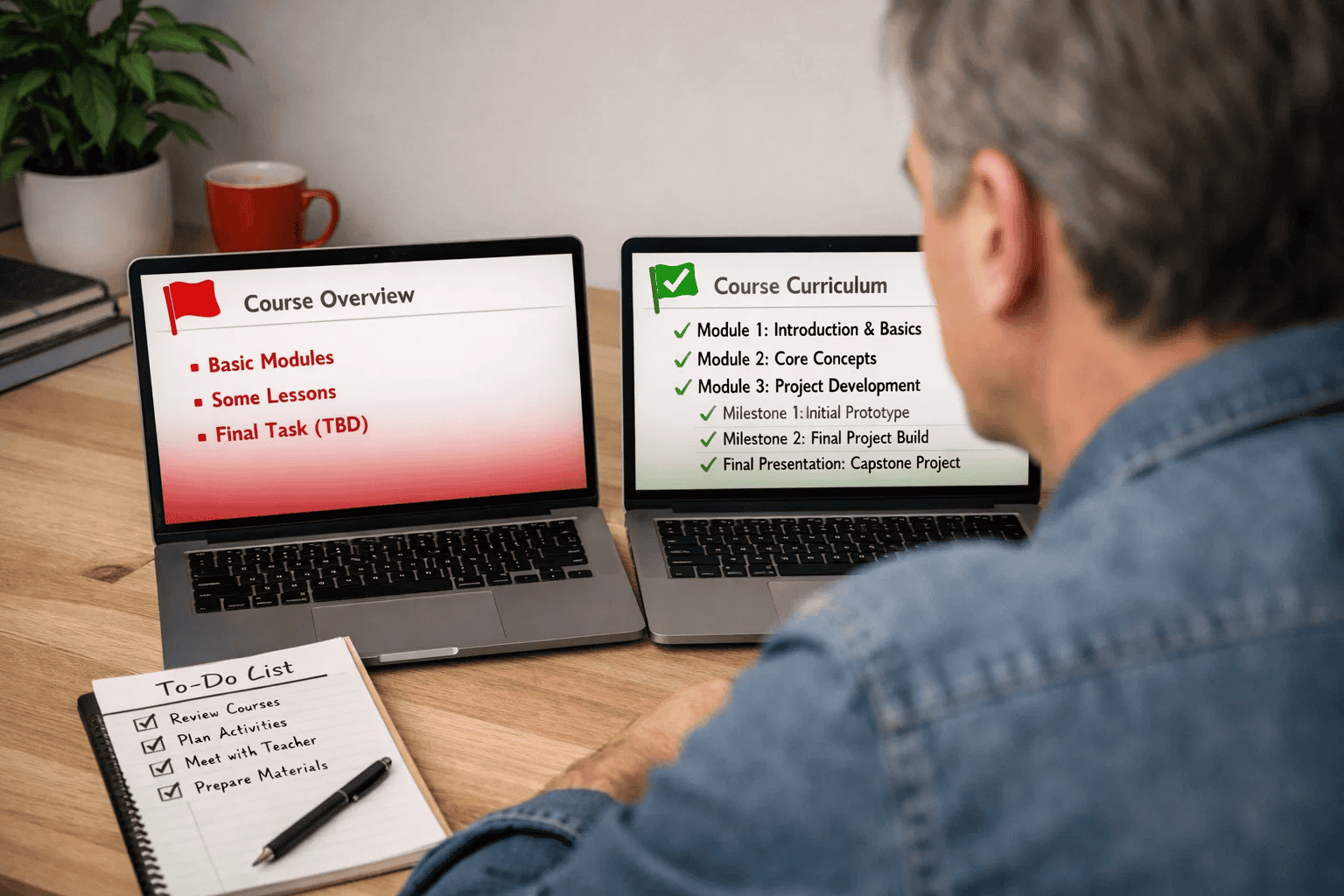
Here’s how to tell if a course curriculum is actually good:
Red Flags (Avoid These)
Green Flags (Look for These)
Don’t make these costly errors:
Mistake 1: Ignoring Your Child’s Interests
Why it’s wrong: Forcing a game-loving kid into web development (or vice versa) kills motivation fast.
✅ Better approach: Find courses that let your child explore their interests. If they love Minecraft, look for Java or Minecraft modding courses. If they’re creative, prioritize courses with game dev or animation options.
Mistake 2: Starting Too Advanced or Too Simple
Why it’s wrong: Bored kids quit. Overwhelmed kids quit. Both waste your money.
✅ Better approach: Use placement assessments. Most quality programs offer skill evaluations. If none exists, start one level easier than you think — confidence builds momentum.
Mistake 3: No Clear Goals or Timeline
Why it’s wrong: “Learn coding” isn’t a goal. Without milestones, you can’t measure progress or celebrate wins.
✅ Better approach: Set specific goals: “Build a working game by month 3” or “Complete first website for grandma’s birthday.” Timelines create momentum and accountability.
Mistake 4: Choosing Based on Marketing Hype
Why it’s wrong: Flashy ads promising “kids will love coding” mean nothing. Results matter.
✅ Better approach: Request sample projects from past students. Ask for parent testimonials with specific results. If they can’t provide examples, keep searching.
Mistake 5: Ignoring Instructor Credentials
Why it’s wrong: A college student who took one Python class isn’t qualified to teach your child professional skills.
✅ Better approach: Ask about instructor backgrounds. Look for professional programmers who also have teaching experience. Industry expertise + pedagogy = quality instruction.
Mistake 6: Expecting Instant Results
Why it’s wrong: Coding is a skill that builds over time, like learning piano. Week 1 won’t create the next Mark Zuckerberg.
✅ Better approach: Commit to at least 3-6 months before judging. Early frustration is normal. Celebrate small wins: first completed program, first bug fixed, first project shared with family.
For more insights on common pitfalls, read about the impact of AI on kids’ education and how to prepare them for the future.
Before you commit, get answers to these critical questions:
About the Program
About Progress and Communication
About Results and Next Steps
About Teaching Approach
Kids can start coding as early as age 5 with visual block-based platforms like Scratch Jr. For text-based programming languages like Python, age 10-11 is ideal when abstract thinking develops. The key isn’t the age but matching the learning approach to your child’s developmental stage and reading ability. Learn more about optimal timing in our guide on the best age for kids to start coding.
For ages 5-10, start with Scratch to build computational thinking without syntax frustration. For ages 11+, you can start directly with Python if your child has strong reading skills. The best approach is Scratch first (building logic), then transition to Python (applying logic with text).
Online classes offer flexibility, access to expert global instructors, and often lower costs. In-person classes provide face-to-face interaction and structured environments. Quality matters more than location — an excellent online course with live instruction and small class sizes outperforms a mediocre local class. Look for features like live interaction, personalized feedback, and regular parent communication regardless of format.
Track these indicators: (1) Your child completes projects they’re proud to show off, (2) They talk about coding concepts at home, (3) Problem-solving improves in other subjects, (4) They ask to code outside of class time, (5) Skills progress from simple programs to complex projects. Good courses provide regular progress reports with specific skills mastered and portfolio examples.
Most courses require a laptop or desktop computer (not tablets for serious coding), reliable internet connection, and specific software depending on the course. Minimum specs: 8GB RAM, modern processor (Intel i5 or equivalent), 256GB storage. Some courses work on Chromebooks for web-based coding, but text-based programming often needs Windows, Mac, or Linux. Check course requirements before purchasing equipment.
Yes! Many quality coding courses prepare students for competitions like Code.org challenges, hackathons, and programming olympiads. After 6-12 months of consistent learning, kids can typically participate in age-appropriate coding challenges. These competitions build portfolios for college applications and provide real-world problem-solving experience. Look for courses that offer competition preparation or participation opportunities.
Choosing the right coding course for your child isn’t about finding the most popular platform or the cheapest option — it’s about matching your child’s learning style, interests, and goals with a program that delivers personalized, industry-level instruction.
At ItsMyBot, we turn screen time into skill time with personalized, industry-level courses that adapt to your child’s pace and potential. We provide international collaboration opportunities, keep parents informed every step of the way, and equip kids with technical know-how that opens doors to high-paying, future-ready careers.
Ready to explore coding courses that grow with your child? Let’s build skills that matter.


